
Anonymous





Purchase price
This add-on is part of our Subscription plan.
Subscribe once — enjoy all add-ons without limits.
The “Purchase price” add-on helps you control profit margins: you see the purchase price and net profit for each product and order. The calculation is performed automatically when the order is moved to a status marked for profit calculation.
What it is for
For stores that need to understand real profit, not just revenue. The add-on stores the product purchase price, calculates order profit from it, and shows the result in the admin panel, so no separate spreadsheets are needed.
Key features
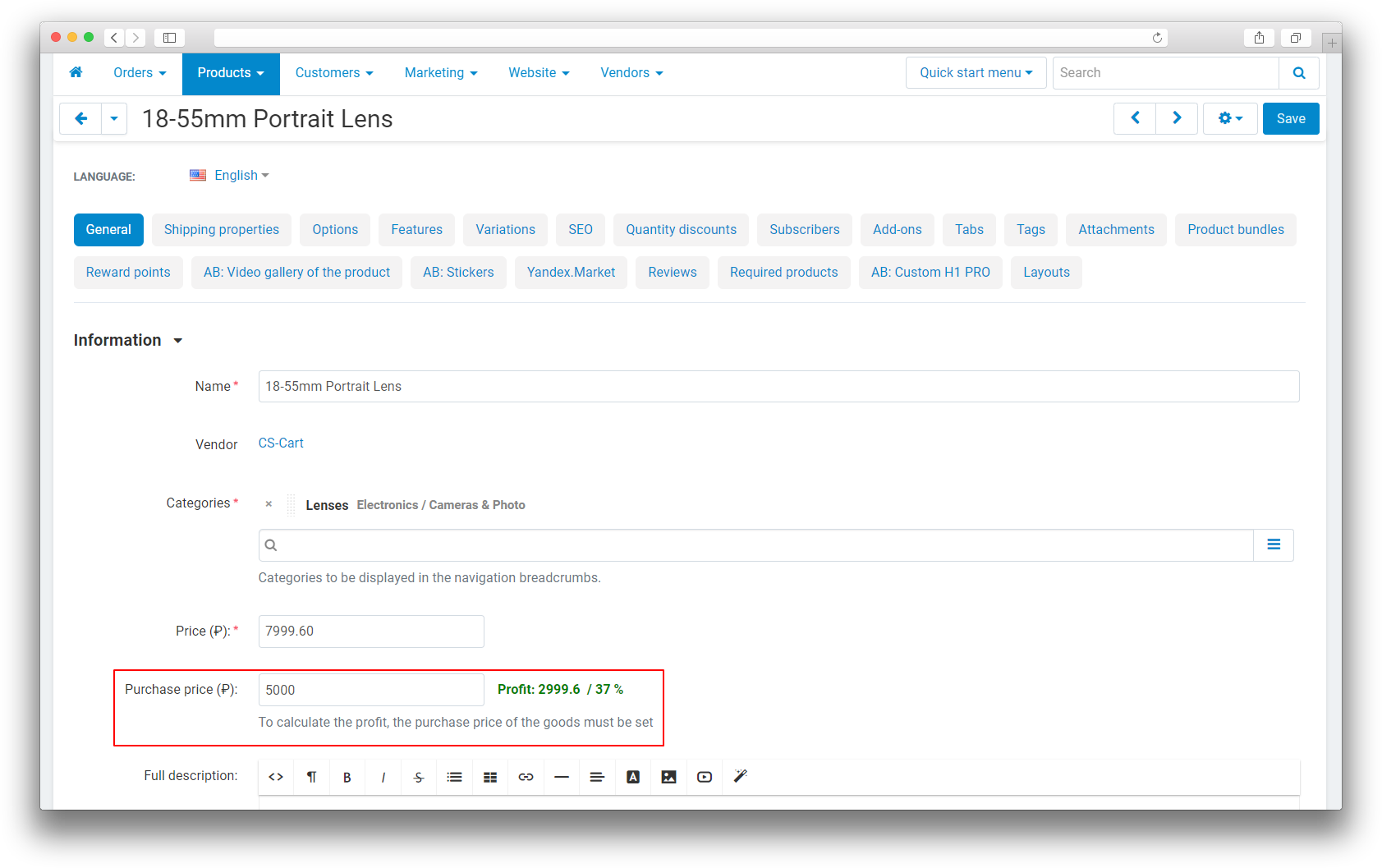
- the “Purchase price” field on the product edit page, “General” tab;
- profit and markup percentage shown in the product card;
- automatic profit calculation per order when moving to marked statuses;
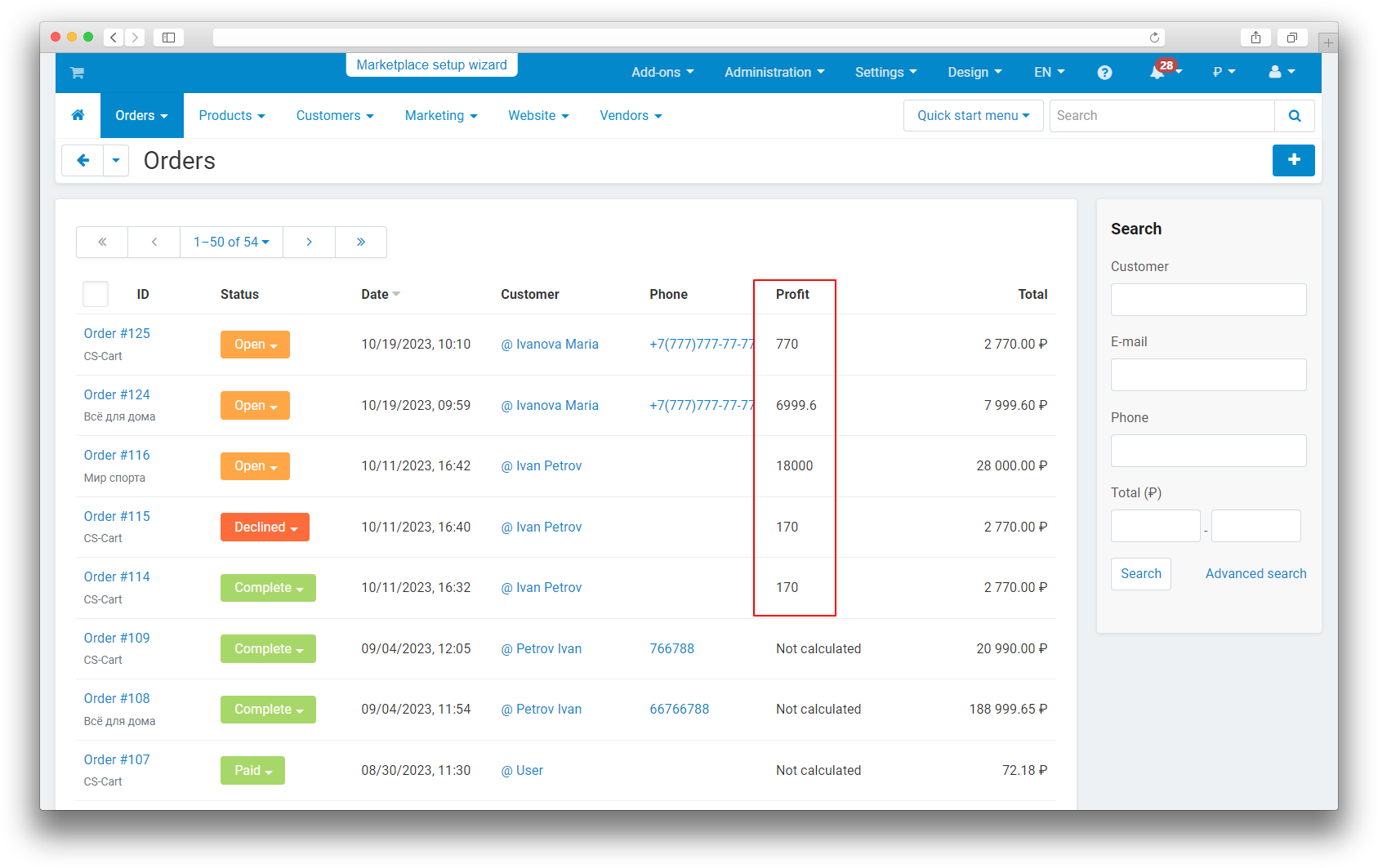
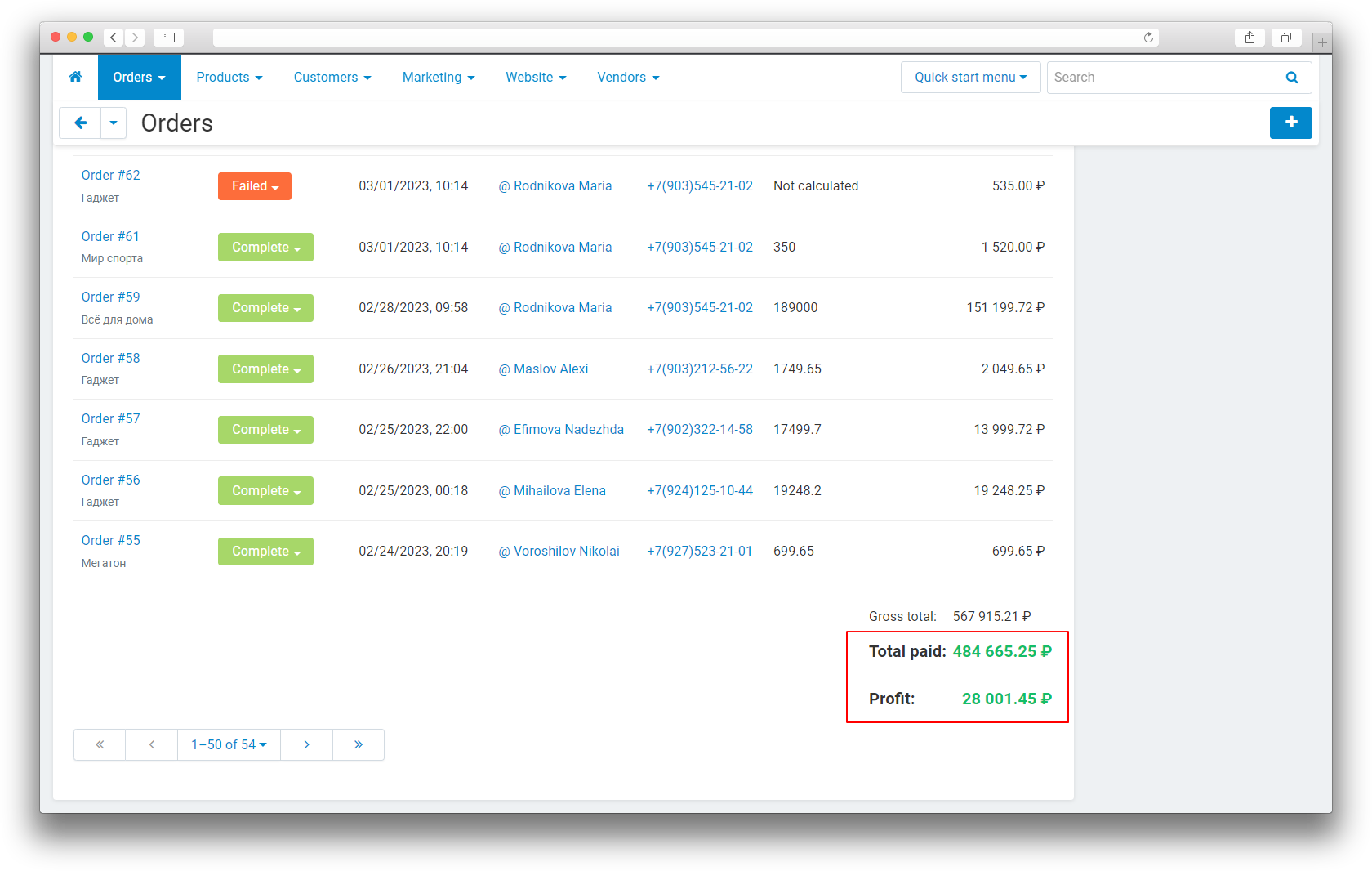
- profit display on the order page, in the orders list, and in the orders summary;
- purchase price import from CommerceML (1C) — from the “Purchase price” price type;
- purchase price export together with products.
How it works
The purchase price is set in the product card or comes from 1C during a CommerceML exchange. When an order is moved to a status marked with the “MS: Use to calculate profit” option, the add-on calculates profit for the order items and saves the result. After that, profit is visible on the order page, in the orders list, and in the summary on the order management page.
The add-on has no separate settings: the statuses for calculation are marked on the order status assignment page, and the purchase price is set on the product. Mass recalculation for all orders runs through the add-on controller service mode — there is no button for it in the interface.
Have questions about the add-on?
Product:
- Store Builder
- Store Builder Ultimate
- Multi-Vendor
- Multi-Vendor Plus
- Multi-Vendor Ultimate
Recipient:
- Owners
- Vendors
Localization:
- English
- Русский
Compatible versions:
- 4.18.X
- 4.17.X
- 4.16.X
- 4.15.X
- 4.14.X
- 4.13.X
- 4.12.X
Instructions for the “Purchase price” add-on
What the add-on does
The add-on stores the product purchase price, calculates order profit from it, and shows the result in the admin panel. The calculation starts automatically when an order is moved to a status marked for profit calculation.
On activation the add-on adds service columns: the purchase price for products and order details, and profit for orders.
Where to find the add-on
The add-on card is available under Administration → Add-ons → Manage add-ons. Order statuses for profit calculation are marked under Administration → Add-ons → Order status assignment. The purchase price is set in the product card, “General” tab.
How to configure it
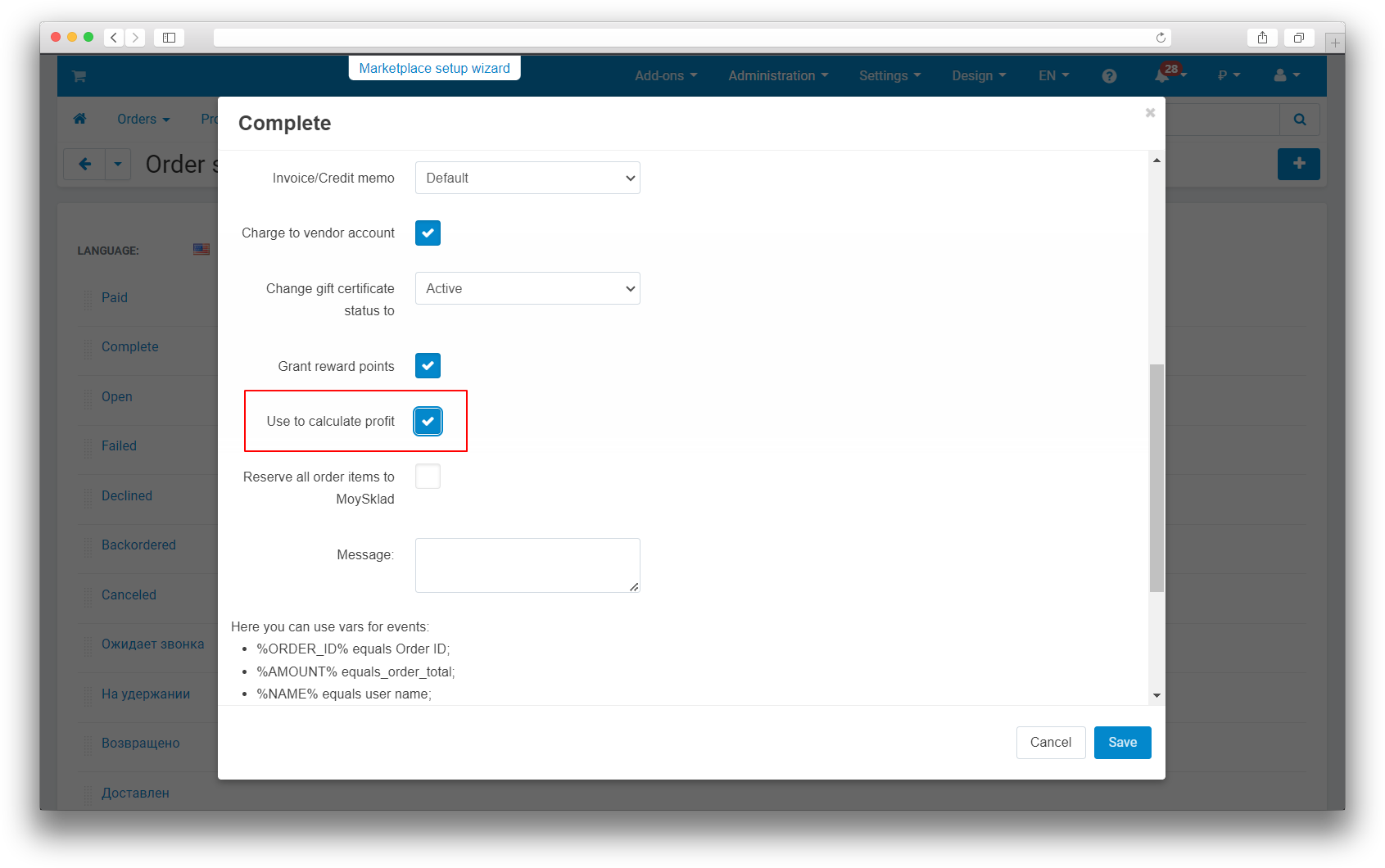
- Open Administration → Add-ons → Order status assignment.
- Enable the “MS: Use to calculate profit” option for the required statuses.
- Save the changes.
The add-on has no separate settings: making the purchase price field required is not configurable.
How it works
Fill in the purchase price in the product card on the “General” tab. The card immediately shows the calculated profit and the markup percentage. When the order is moved to a marked status, profit is calculated automatically and displayed on the order page, in the orders list, and in the summary on the order management page.
1C exchange
When importing from 1C, the purchase price is taken from the “Purchase price” price type. The purchase price is also exported together with products.
How to check the result
- Fill in the purchase price for a product and make sure the “General” tab shows the calculated profit and the markup percentage.
- Mark an order status for profit calculation and move a test order to it.
- Open the order page: the totals block must show profit, and the orders list must show the “Profit” column.
- Check the summary on the order management page: the profit total and the number of calculated orders.
Typical problems
- Profit shows “Not calculated”. The purchase price is not filled in for the product, or the order is in a status without profit calculation. Fill in the price and move the order to a marked status.
- Profit was not recalculated. Make sure the “MS: Use to calculate profit” option is enabled for at least one status.
- The order shows “Profit is not calculated”. The purchase price is missing for one of the order products.
Mass recalculation
Profit is recalculated on every order status change. Mass recalculation for all orders runs through the add-on controller service mode; there is no button for it in the administration panel.
Changelog
v1.5.2 from 29.10.2026
[*] Updated the add-on description and instructions; added localized materials and the logo.
v1.5.1
[*] Updated the add-on template.
v1.5.0 from 2026-03-17
[*] Updated the add-on according to the template.
[*] Moved the installation SQL into migrations.
[!] Fixed SQL injections by using placeholders.
[!] Added isset checks for $_REQUEST and arrays.
v1.4.1 from 2023-12-26
[!] Fixed the admin panel failure caused by division by zero when a product was created.
v1.4.0 from 2023-10-21
[*] Moved the order status assignment settings to the statuses page.
[*] Added hints on the orders page and in products.
[*] Standardized the add-on.
[-] Removed the settings from the add-on tabs.
v1.3.4 from 2022-04-28
[!] Fixed the logic of adding the purchase price column.
v1.3.3 from 2022-03-21
[+] Added transfer of the product purchase cost during 1C exchange.
[!] Fixed critical errors that broke the orders and products pages after installation.
v1.3.2 from 2020-05-15
[!] Release only.
v1.3.1 from 2020-05-15
[!] Changed the add-on installation process.
v1.3.0 from 2020-05-13
[-] Reduced the required-field functionality of the purchase price field.
[!] Fixed a calculation error.
v1.2.1 from 2020-04-28
[!] Fixed a deletion error and corrected the database query.
v1.2.0 from 2020-04-24
[+] Added multi-select support.
[!] Fixed import and export of the purchase price field.
v1.1.1 from 2020-04-21
[+] Added support for negative profit.
v1.0.1 from 2020-04-06
[!] Fixed an error with a language variable.
v1.0.0 from 2020-04-04
[+] First release.
Legend:
[+] Added
[-] Removed
[*] Changed
[!] Bug fixed
Reviews