

This add-on is part of our Subscription plan.
Subscribe once — enjoy all add-ons without limits.
Advanced product blocks
The add-on expands standard CS-Cart product blocks and helps show more relevant recommendations, random picks, and related products. It fits storefront scenarios where relevance, variety, and a clean product presentation matter.
What it is for
The add-on is useful when the default product block is not enough and you need flexible storefront product output. It helps show products from the main category of the current product, display random selections, and build related products from the selected feature value.
It is also handy when you want to show the block only for out-of-stock products or keep compatibility with the legacy recommended products filling.
Key features
- shows products from the main category of the current product while excluding the current product itself;
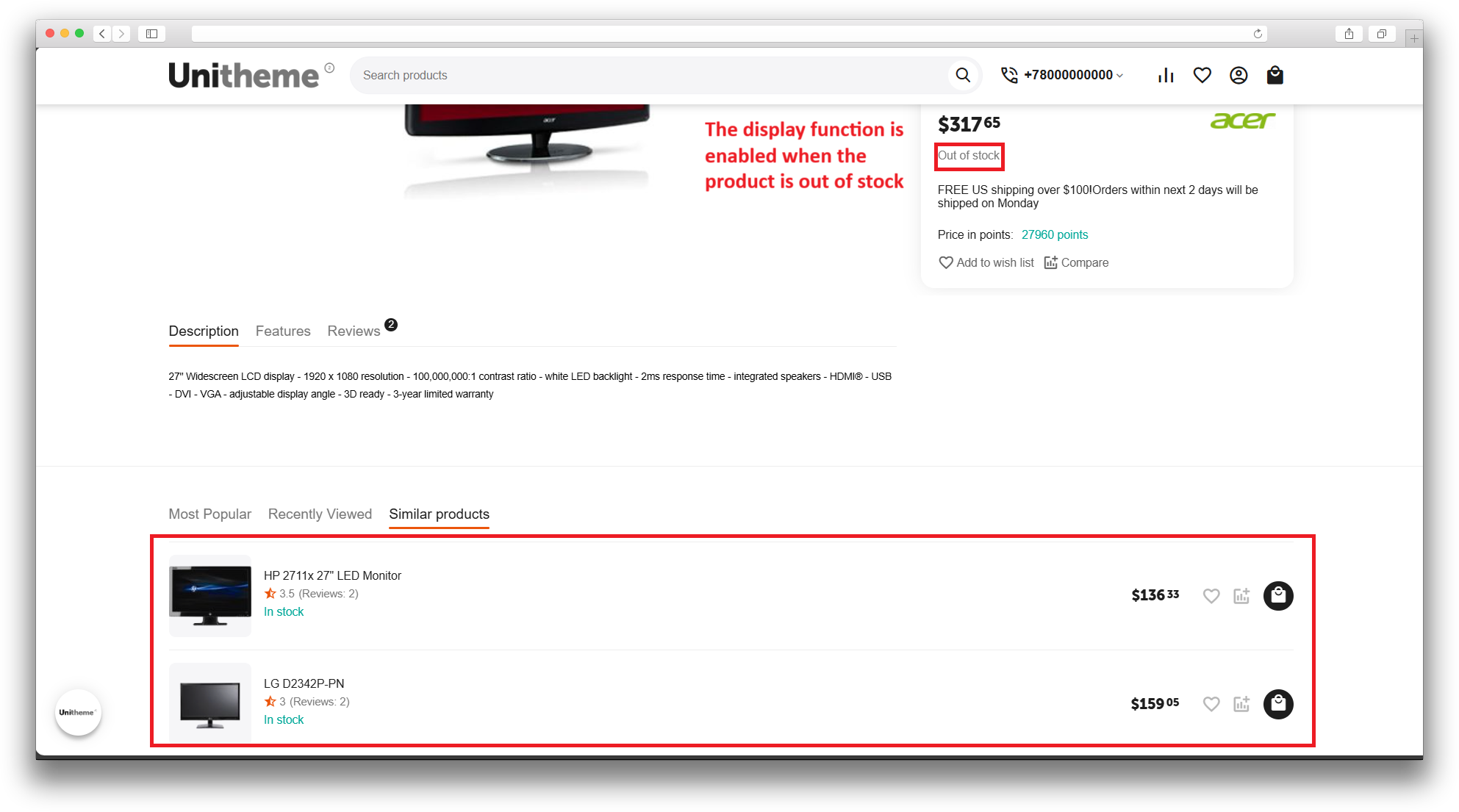
- can hide the block when the product is in stock and show it only for out-of-stock products;
- adds the “Random products” filling with limit, category, sorting, and random offset settings;
- adds the “Related products” filling based on the selected feature value;
- keeps compatibility with the legacy recommended products filling;
- works through the standard CS-Cart block manager.
How it works
After you choose a filling, the block gets products according to the add-on rules. The main-category block uses the current product’s main category, the random block selects products inside the chosen conditions, and the related-products block reads the selected feature value and finds products by the codes stored there.
For related products, the selected feature value must store product codes separated by semicolons. After that, you can place the block on product pages, category pages, the homepage, or any other storefront area where the Products block is used.
Have questions about the add-on?
- Store Builder
- Store Builder Ultimate
- Multi-Vendor
- Multi-Vendor Plus
- Multi-Vendor Ultimate
- Buyers
- Owners
- English
- Русский
- 4.20
- 4.19.X
- 4.18.X
- 4.17.X
- 4.16.X
Instructions for Advanced Product Blocks
What the add-on does
The add-on adds several fill options for the standard Products block and helps you control storefront output more precisely. It can show products from the main category of the current product, display random products, build a related-products block from a feature value, and keep compatibility with the legacy recommended products filling.
For the main-category block, you can also show it only for out-of-stock products. For random products, you can configure the limit, category selection, random sorting, and random offset. For related products, the add-on reads the selected feature value of the current product, where product codes must be stored as a semicolon-separated list.
Where to find it
- Add-ons → Manage add-ons — the add-on settings page, where the related-products feature is selected and helper text is shown.
- Design → Layouts — where you add or edit a Products block and choose its filling.
- Product page, category page, and homepage — the usual storefront areas where the add-on blocks are used.
How to configure the add-on
- Open the add-on settings page and find the related-products settings section.
- In Feature for related products, choose the feature that will be used for the MS: Related products filling.
- In the selected feature value, store product codes as a semicolon-separated list, for example ABC-001;ABC-002;ABC-003.
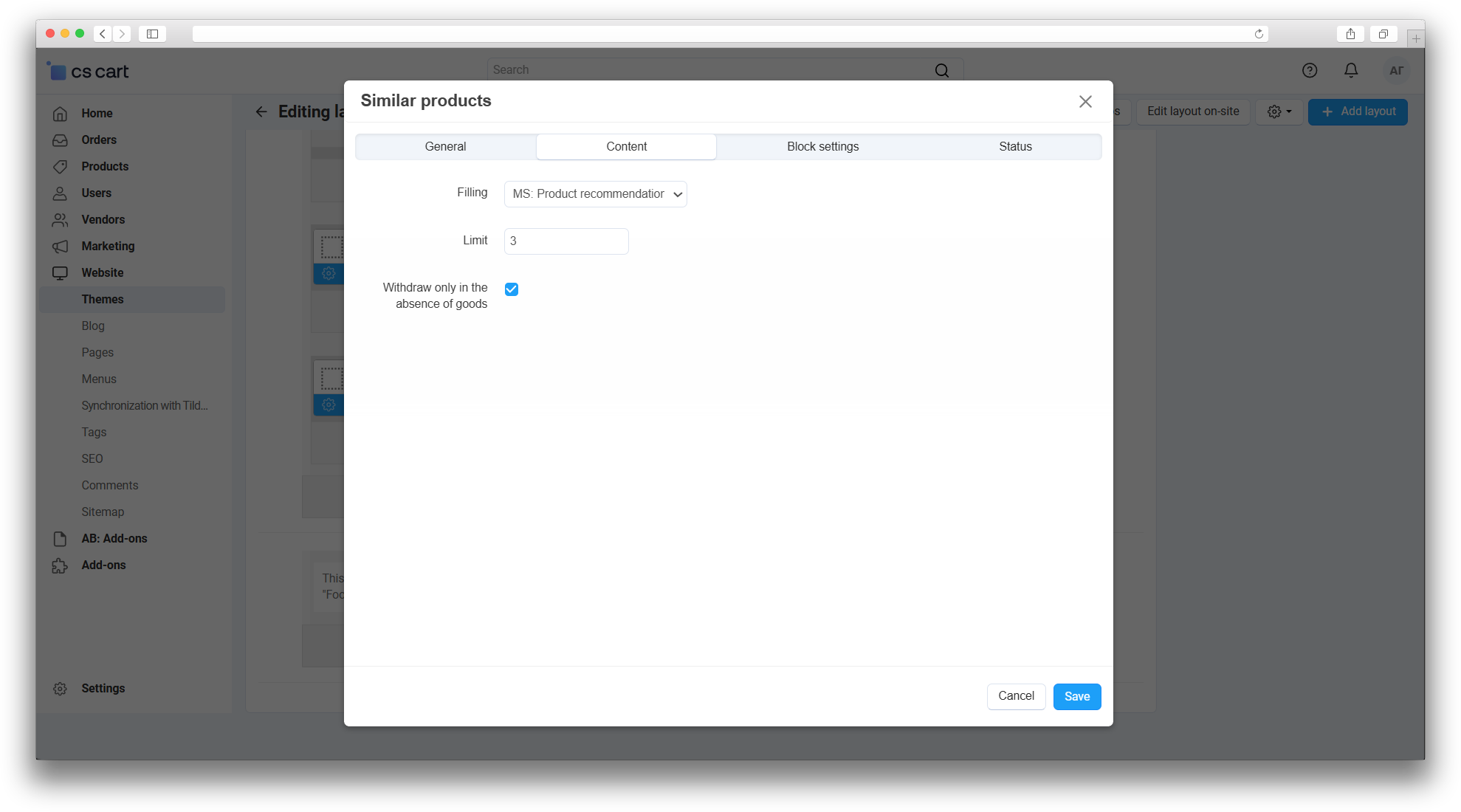
- If you need the main-category block, choose MS: Products from the main category as the block filling.
- If you want the block to appear only for out-of-stock products, enable Show the block only for out-of-stock products.
- If you need random output, choose MS: Random products and configure the limit, categories, random sorting, and random offset.
- If you need related products, choose MS: Related products.
How to verify that it works
- Open a product page and check the main-category block, the current product itself must not appear in the list.
- For an in-stock product, check that the block with the out-of-stock-only option stays hidden.
- Open a category page or the homepage and check the random-products block. Reload the page a few times, the product set should change within the configured conditions.
- Open a product with a filled feature value and check the related-products block. It should show the products whose codes are stored in that feature value.
- If the legacy Recommended products (compatibility) filling is used, make sure it still works in the layouts where it was already configured.
If the block does not show products
- Check that the product has a main category.
- Check that the correct feature is selected for related products.
- Check that the feature value really contains product codes separated by semicolons.
- Check that the products with those codes are active, visible on the storefront, and in stock.
- After changing settings, clear the cache if the storefront does not refresh the block immediately.
Changelog
v2.1.0
30.04.2026
Changes and improvements:
- Updated the add-on template.
Bug fixes:
- Fixed random offset handling in random product blocks.
- Fixed related product selection for stores with different product catalog structures.
v2.0.0
15.04.2026
New features and improvements:
- The add-on was merged with the functionality of ms_products_filling, ms_related_products, and ms_random_products.
- Added the “MS: Random products” and “MS: Related products” fillings.
- Added a feature ID setting for the related products block.
- Kept compatibility with the legacy recommend filling.
- Added support for related-products storefront templates for abt__unitheme2.
Changes and improvements:
- Updated the add-on description and instruction.
v1.2.0
21.02.2026
Changes and improvements:
- Updated the add-on template.
v1.1.3
14.08.2024
New features and improvements:
- Standardized the add-on and added the add-on image.
Changes and improvements:
- Updated language files.
v1.1.2
03.07.2024
Bug fixes:
- Fixed product output for in-stock products.
v1.1.1
28.06.2024
New features and improvements:
- Added the option to show the block only when the product is out of stock.
v1.1.0
27.06.2024
New features and improvements:
- Additional products are hidden when the main product is in stock.
Changes and improvements:
- Category detection now uses the main subcategory instead of the parent category.
v1.0.0
27.06.2024
New features and improvements:
- Initial release.
Here you can share your opinion and evaluate our work.
Your feedback helps us become better and offer you even better service.