


Product Name by Characteristics
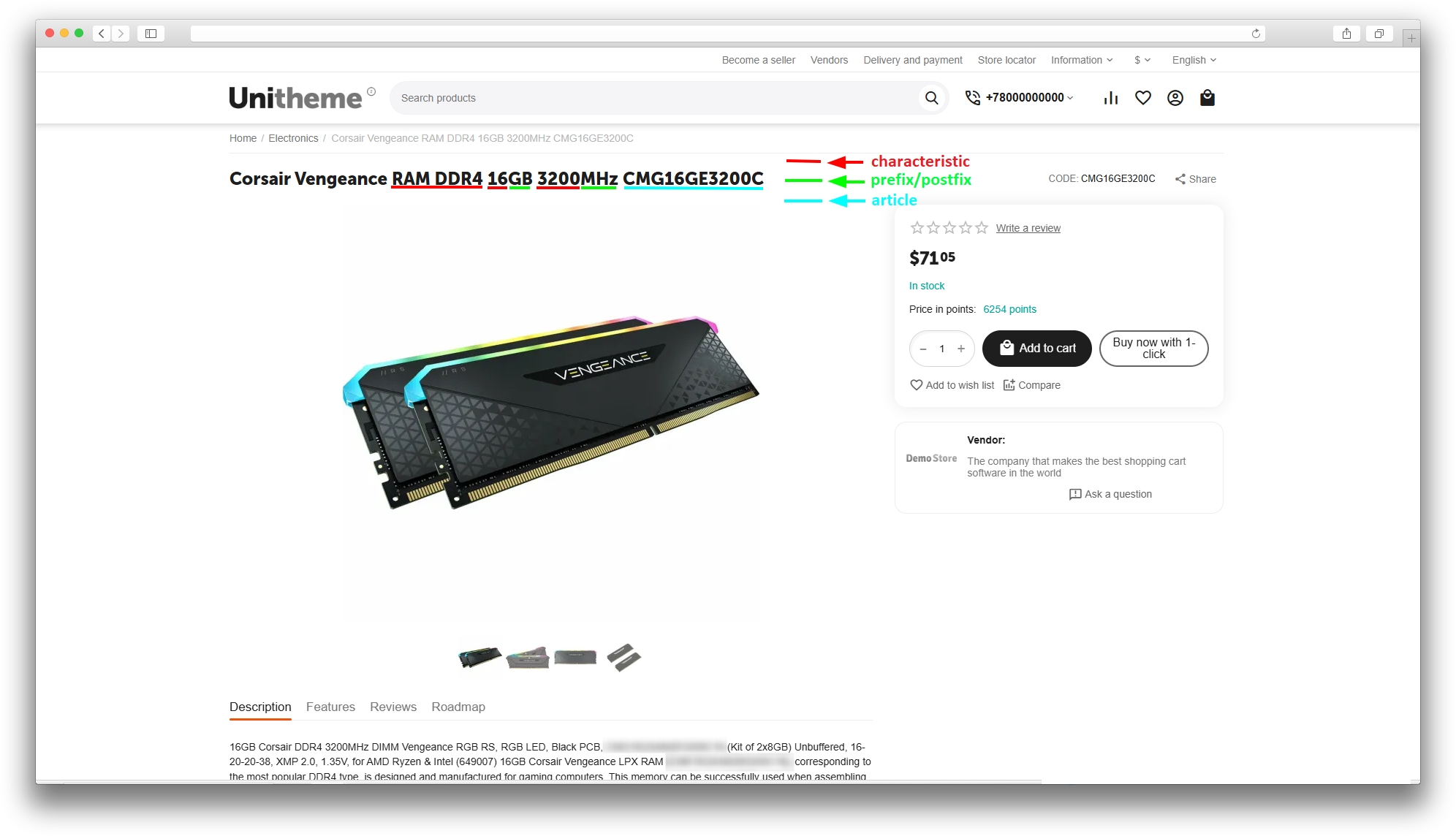
The add-on automatically builds a clear product name from selected features, an item code, and the saved original name. It helps keep a consistent catalog format without renaming every item manually.
This add-on is part of our Subscription plan.
Subscribe once — enjoy all add-ons without limits.
What it is for
The add-on is useful for stores with large catalogs, where the product name should include the size, color, material, model, item code, or other important parameters. The administrator marks the required features and sets their order, and the add-on builds the name when the product is saved or imported.
This reduces manual errors, speeds up catalog maintenance, and makes product cards more informative for customers and search engines.
Key features
- automatic product name generation from marked features;
- adding an item code — the product code or the manufacturer code — to a configured position in the name;
- setting the order of features and the item code by numeric positions, with values output in ascending order;
- a prefix and a postfix before and after a feature value, configured separately for each language;
- using the SEO variant of a feature value when one is set;
- skipping features that are used by a variation group;
- saving the original product name and restoring it — for a single product or in bulk;
- using the old name or the exchange name as the base for the new name;
- generating the name immediately after product import;
- locking manual editing of the Product name field and setting a default value for new products.
How it works
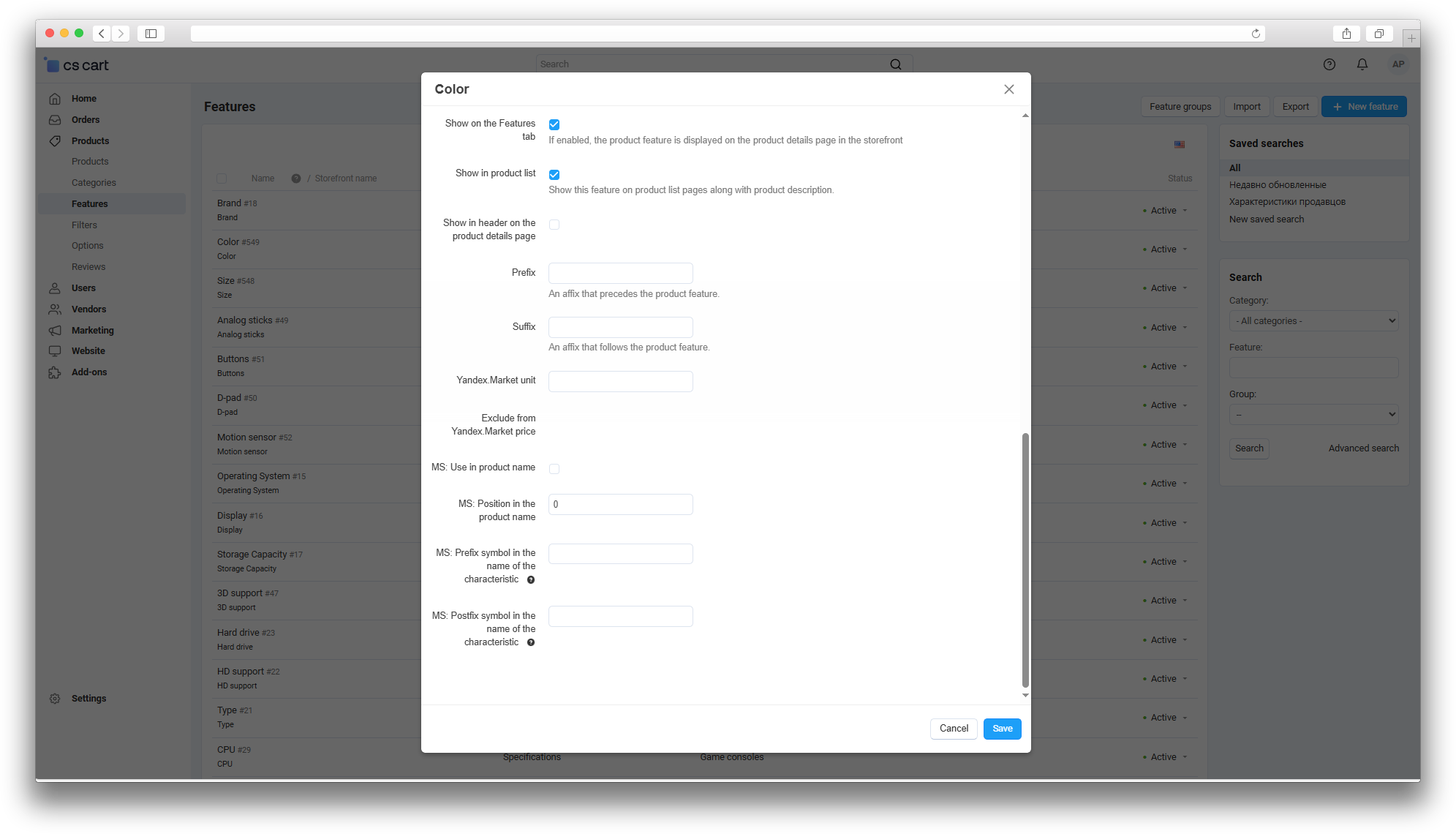
A settings block appears on the feature editing page: use the feature in the product name, set its position, and add a prefix or postfix. When a product is saved, the add-on collects the marked features, sorts them by position, and writes the resulting string into the product name.
With extra settings enabled, the add-on also adds the item code, stores the original product name in a backup field, uses the exchange name, or generates the name after import. The previous name can be restored for a single product or for all products that have a saved old name.
Have questions about the add-on?
- Store Builder
- Store Builder Ultimate
- Multi-Vendor
- Multi-Vendor Plus
- Multi-Vendor Ultimate
- Owners
- English
- Русский
- 4.21.X
- 4.20
- 4.19.X
- 4.18.X
- 4.17.X
- 4.16.X
- 4.15.X
- 4.14.X
- 4.13.X
- 4.12.X
Instructions for “Product Name by Characteristics”
What the add-on does
The add-on builds a product name from selected features and, if needed, adds the item code or the saved original name. The final name is written to the standard Product name field.
The add-on stores the original product name in a backup field, so the previous name can be restored for a single product or in bulk for all products that have a saved copy.
Where to find the add-on
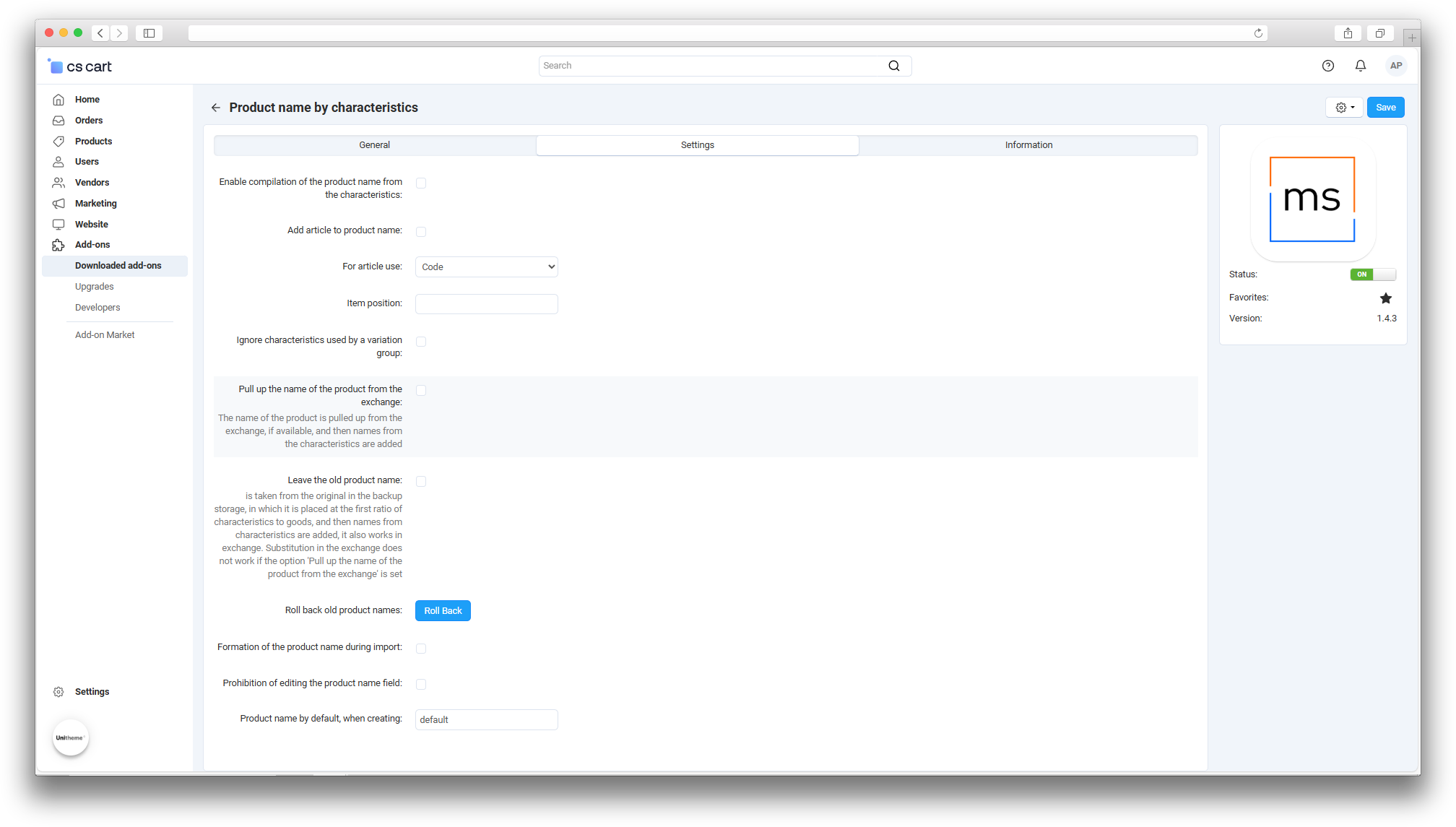
- Administration → Add-ons → the “Product Name by Characteristics” add-on card — general add-on settings in the “General” section.
- Products → Features → feature card — the fields “MS: Use in product name”, “MS: Position in the product name”, “MS: Prefix symbol in the name of the characteristic”, and “MS: Postfix symbol in the name of the characteristic”. They are not shown for every feature type — the block is hidden for group features.
- Products → Products → editing a product — the “MS: Product name from the specification” block with the old name and the “Roll back the product name” button.
- Administration → Import/Export → Product import — with the setting enabled, the add-on rebuilds names after the import finishes.
General settings
- Enable compilation of the product name from the characteristics — enables automatic name generation. While it is off, the add-on does not change product names.
- Add article to product name — adds the item code to the final name.
- For article use — selects the item code source: “Code” (the standard field) or “Manufacturer code” when it is available through a compatible stock-parser add-on.
- Item position — sets the place of the item code relative to the features. Values with a lower position are output first.
- Ignore characteristics used by a variation group — excludes features linked to a variation group from the final name.
- Pull up the name of the product from the exchange — during data-exchange import, uses the exchange name as the base and then adds feature values.
- Leave the old product name — puts the saved original name before the feature values. If “Pull up the name of the product from the exchange” is also selected, the exchange name is used during exchange.
- Formation of the product name during import — runs name generation after product import finishes.
- Prohibition of editing the product name field — locks manual editing of the standard Product name field on the product editing page.
- Product name by default, when creating — the value inserted into the name field when a product is created while editing is locked.
The add-on settings also contain a Roll Back button next to the Roll back old product names item — this is the bulk restore of saved names.
Feature setup
- Open the required product feature and enable MS: Use in product name if its value should be included in the product name.
- Set MS: Position in the product name — features with a lower number are output earlier.
- If needed, fill in MS: Prefix symbol in the name of the characteristic — text before the value — and MS: Postfix symbol in the name of the characteristic — text after the value.
Prefix and postfix values are stored separately for each language, so check them for every language used in the store.
Product name generation
When a product is saved, the add-on collects the marked features, sorts them by position, and joins the values into one space-separated string. The order is defined by numeric positions: feature and item positions are sorted in ascending order, and values without a position are placed at the beginning.
If a SEO variant is set for a feature value, the add-on uses it; otherwise it uses the regular feature value. If item code insertion is enabled, the item code is placed in the configured position. If keeping the old name is enabled, the original name is added before the feature values.
Product import
If Formation of the product name during import is enabled, the add-on rebuilds names after product import finishes. With Pull up the name of the product from the exchange enabled, names are taken from the imported exchange data and then feature values are appended.
Restoring names
On the product editing page, the “MS: Product name from the specification” block shows the saved old name and provides the Roll back the product name button — it restores the previous name for the current product.
The bulk restore is performed by the Roll Back button next to Roll back old product names in the add-on settings: it returns the saved names for all products that have the backup field filled. Before a bulk restore, make a database backup or test the action on a staging copy of the store.
How to check the result
- Enable the add-on and the Enable compilation of the product name from the characteristics setting.
- Open a feature, enable its usage in the product name, and set its position.
- Open a product with this feature and save it.
- Check that the product name has changed according to the configured order.
- If the item code is used, check its position in the final name.
- If import is used, import a test product and make sure the name is generated after the import finishes.
- Check the restore button on the product editing page and the bulk restore in the add-on settings on test data.
Typical problems
- The name does not change. Check that the add-on and the “Enable compilation of the product name from the characteristics” setting are on, and that the feature has “MS: Use in product name” enabled.
- A feature is missing from the name. Check that the product has a value for the feature and that it is not excluded by “Ignore characteristics used by a variation group”.
- The order of values is wrong. Check the feature positions and the item position: values are sorted in ascending order.
- The name does not work in another language. Prefix and postfix values are configured per language — fill them in for the required language.
Changelog
v1.4.4 from 06.10.2026
[*] The add-on has been updated to the current module template.
v1.4.3 from 2024-11-20
[+] Standardized add-on text files.
v1.4.2 from 2024-07-27
[+] Added a migration file.
[+] Added tooltips for function settings.
[*] Changed prefix and postfix storage: values are now stored separately for each language.
[!] Fixed compatibility with the Discogs integration add-on.
v1.4.1 from 2023-08-10
[!] Fixed default name insertion when creating a product.
v1.4.0 from 2023-08-10
[+] Added a default product name setting for product creation.
[!] Fixed product creation when the product name field is locked.
[!] Fixed third-party add-on connection to the product name editing hook.
v1.3.11 from 2023-07-01
[!] Fixed the import schema that overwrote actions of other add-ons after import.
v1.3.10 from 2023-05-30
[!] Fixed product name generation from features being triggered during export.
v1.3.9 from 2023-05-30
[+] Added product name generation from features during import.
[+] Added the ability to block editing of the product name field.
v1.3.8 from 2023-04-26
[+] Added add-on licensing and update support.
[!] Fixed adding the product name to features when it had previously changed during data exchange.
v1.3.7 from 2023-04-26
[*] The old product name insertion setting is now global and works when editing a product.
[*] The setting for adding the exchange product name to features was moved to high priority.
[*] Updated language variables.
v1.3.6 from 2023-04-25
[+] Added a setting for adding the old product name from backup storage to features during data exchange.
v1.3.5 from 2023-04-20
[!] Fixed language variables.
v1.3.4 from 2023-04-20
[+] Added a setting for adding the product name from data exchange to features.
v1.3.3 from 2023-01-20
[+] Added the ability to set prefix and postfix values in feature settings.
v1.3.2 from 2022-12-28
[*] Standardized the add-on code.
v1.3.1 from 2022-12-14
[*] Changed the main hook for correct operation during CommerceML import.
v1.3.0 from 2022-11-29
[+] Added the “Ignore characteristics used by a variation group” setting.
[+] Added translation.
[*] Adjusted add-on logic.
v1.2.0 from 2022-11-25
[+] Added the core name generation functionality.
v1.1.0 from 2022-11-24
[+] Added feature settings.
[+] Added add-on settings.
v1.0.0 from 2022-11-24
[+] Initial release.
Legend:
[+] Added
[-] Removed
[*] Changed
[!] Bug fixed
Here you can share your opinion and evaluate our work.
Your feedback helps us become better and offer you even better service.