Иван



This add-on is part of our Subscription plan.
Subscribe once — enjoy all add-ons without limits.
Advanced Geolocation
The add-on extends default CS-Cart geolocation, helps detect the customer city more flexibly, and uses that location data in storefront widgets and checkout. It is useful when you want to show the current city, allow manual selection, and adapt checkout to the selected location.
What it is for
The add-on detects the customer city by IP via 2ip or SypexGeo, lets the customer choose a city manually, and applies the location data to checkout. It connects geolocation, storefront blocks, and checkout data in one workflow.
Key features
- automatic city detection by IP;
- choice between 2ip and SypexGeo;
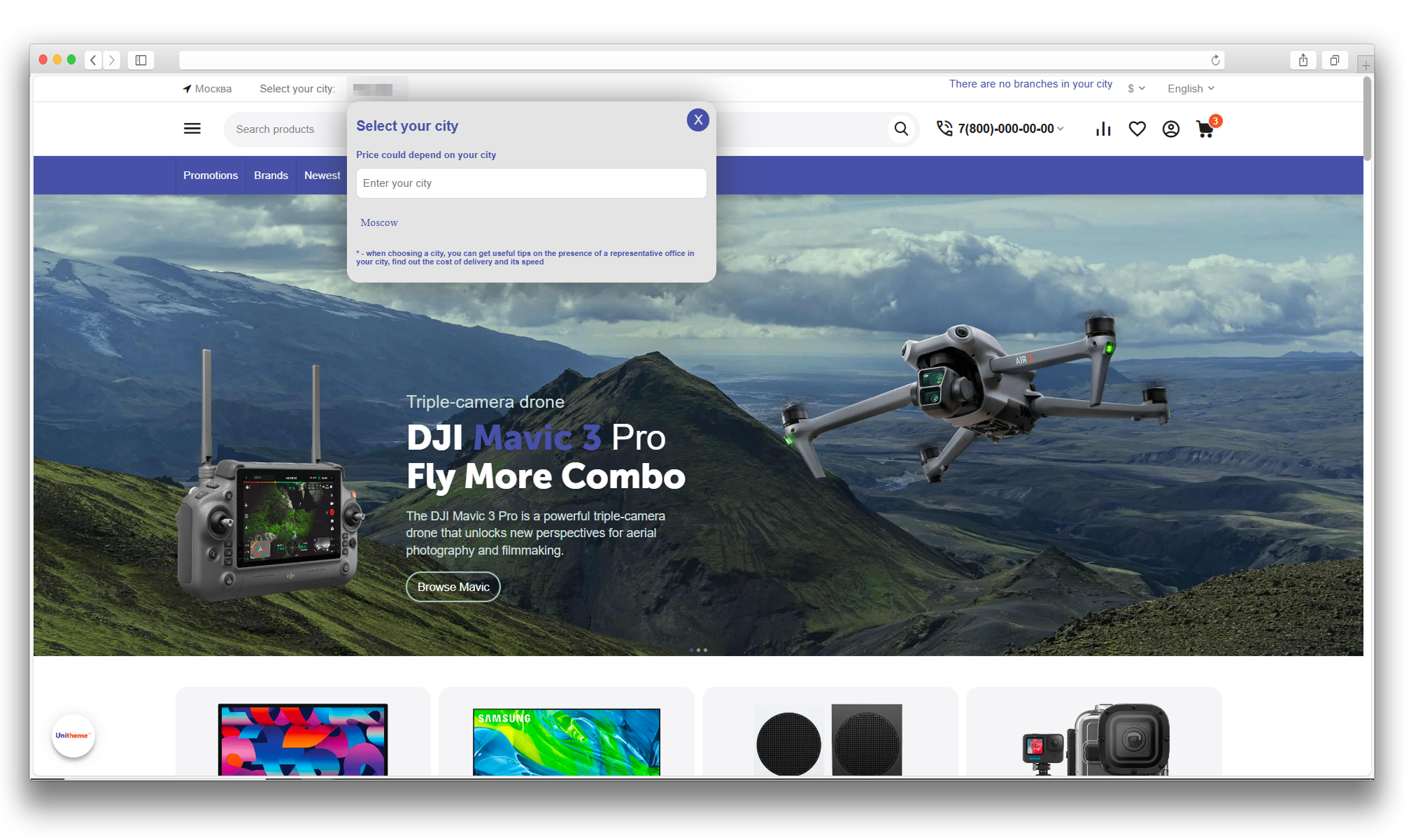
- manual city selection on the storefront and confirmation popup;
- ready-made blocks for city selection and city information;
- city, region, and country data applied to checkout;
- support for the cities and rus_cities add-ons;
- request limits and bot protection.
How it works
The add-on requests geolocation data by IP, stores the selected city in the session, and transfers the data into checkout customer fields. If a city management add-on is active, the detected city is matched with a database record. If no match is found, API data is used directly.
The administrator can choose the geolocation service, set the API key, limit requests, and hide the popup if it is not needed.
Have questions about the add-on?
Product:
- Store Builder
- Store Builder Ultimate
- Multi-Vendor
- Multi-Vendor Plus
- Multi-Vendor Ultimate
Recipient:
- Buyers
- Owners
Localization:
- English
- Русский
Compatible versions:
- 4.21.X
- 4.20
- 4.19.X
- 4.18.X
Instructions for Advanced Geolocation
What the add-on does
The add-on detects the customer city by IP via 2ip or SypexGeo, lets the customer choose a city manually, and applies the location data to checkout. If a city management add-on is active, it uses its data and can match the detected city with a database record.
Where to find the add-on
The add-on settings are available in Administration → Add-ons → Manage add-ons → Advanced Geolocation.
The add-on blocks are added in Design → Block manager: MS: Customer location and MS: City info.
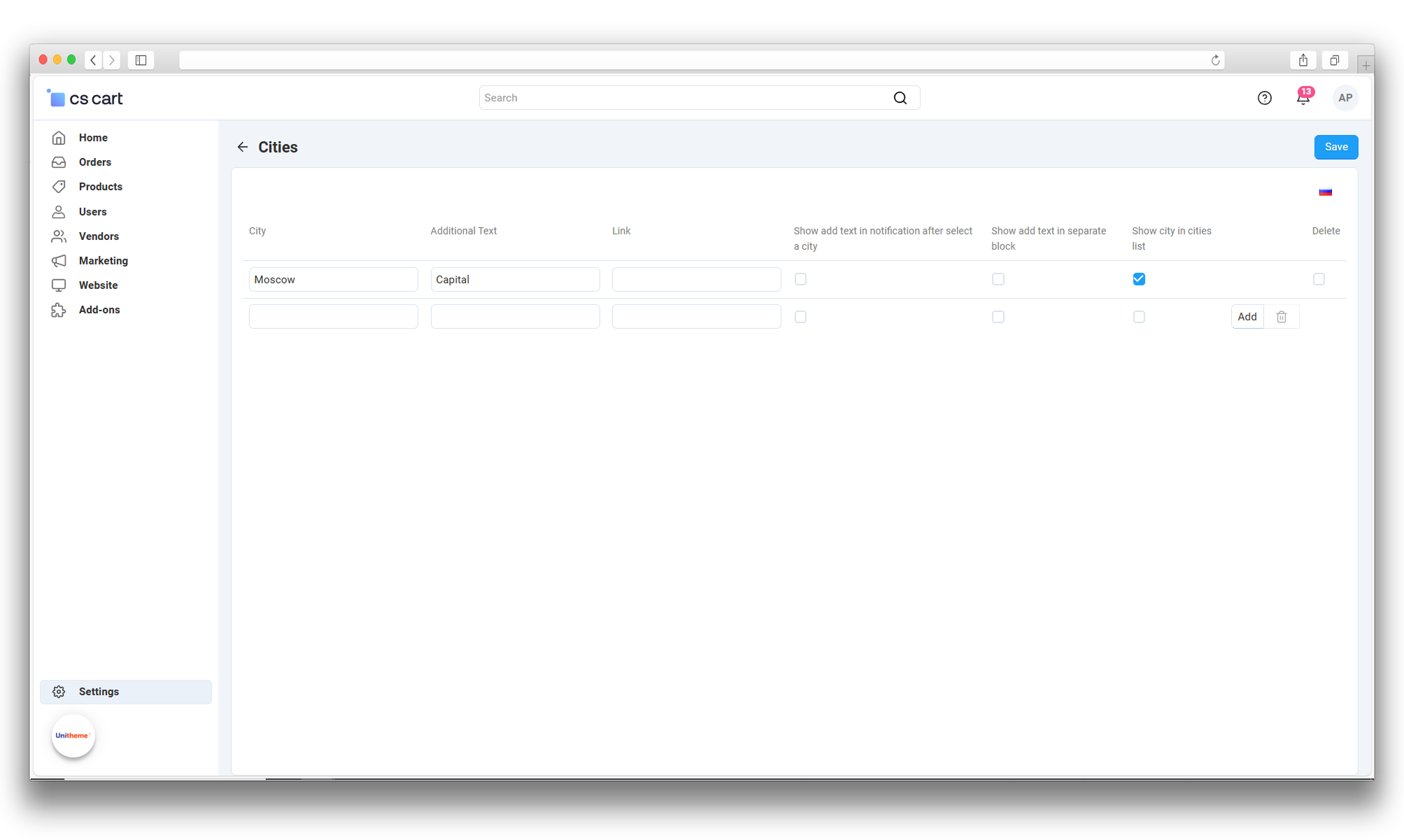
Manage cities in the standard CS-Cart Cities section. The add-on extends this list with extra fields. There is no need to look for a separate "MS: Advanced Geolocation. Cities" section.
How to configure a city
- Open the standard Cities section in the administration panel and find the city.
- Click the arrow in the city row, as shown below, to expand the extra add-on fields.
- Fill in Additional text and Link if needed.
- Choose where to show the additional text: in a notification after city selection, in a separate block, or both. For a separate block, add MS: City info to the storefront.
- Enable Display the city in the selection list if the city should be available in the storefront selection list.
- Click Save at the top of the page.

Settings
Geolocation service: choose 2ip.io or SypexGeo.
API key: for 2ip.io, enter the token from your account at 2ip.io. A token is required for the free quota too. Keys from 2ip.me are not compatible. For SypexGeo, use a SypexGeo key. Without a key, automatic detection is unavailable, but manual city selection remains available.
Requests count: attempt limit per 24 hours in the current session, including failures. 0 disables automatic detection. A successful result is cached in the session instead of being requested on every page.
Hide popup — disables the city confirmation popup.
How to use it
1. Open the add-on settings and select a geolocation service.
2. Enter the selected service token and save the settings.
3. Set the request limit and enable popup hiding if needed.
4. Add the city selection block to the storefront if you want manual city selection.
5. Add the city info block if you want to show additional text or a link.
6. In the standard Cities section, check the city list and fill in the extra fields by expanding the required city row with the arrow.
How to check the result
1. Open the storefront in a new private window and check automatic city detection. Detection is based on IP, so VPNs and proxies may affect the result.
2. Select a city manually and make sure it is stored in the session.
3. Check that checkout fields are filled with city, region, and country data.
4. If the popup is enabled, make sure it appears after city detection.
5. If city management add-ons are used, verify the selected city in their list and in the add-on blocks.
If the city is not detected
Check the selected service, token and account limits. The retry delay is 5 minutes after an error or 15 minutes after HTTP 429 (request limit). The daily attempt limit still applies. Manual city selection remains available.
Errors are written to the standard CS-Cart log when HTTP/HTTPS request logging is enabled; otherwise they go to the server PHP error log. Look for ms_geolocation. These messages do not include the token, IP or response body. After changing the service or token, save the settings: the attempt counter resets on the next storefront page load. A manually selected city is preserved.
Changelog
v1.5.0 from 2026-09-28
[+] The region code from the geolocation service is converted into the CS-Cart region code: previously a value like RU-ORL got into the order and shipping was not calculated, now the code from the region directory is stored.
[+] The city from the service is now matched by region, so namesakes in different regions no longer prevent IP-based detection.
[+] The postal code from the service is used as an additional check when the region does not resolve the city.
[+] Identical names inside one region (directory duplicates) no longer block detection: the fullest record is selected.
[!] Automatic detection no longer overwrites the city, region and country already entered by the customer at checkout.
[+] The daily counters now include city matching statistics: matched by region, matched by postal code, duplicates, ambiguous and missing cities, API calls.
v1.4.2 from 2026-09-25
[!] Fixed the local database block in the add-on settings: the database state, its data date, the update button and the daily counters are now displayed on CS-Cart 4.17 as well, where the block previously reported that the database was unavailable.
v1.4.1 from 2026-09-18
[*] Code and supporting files were brought to the add-on standard: file headers, include order, function documentation and named constants instead of letter values. The add-on behaviour is unchanged.
v1.4.0 from 2026-09-18
[+] Added three city detection modes: local database only without API calls, hybrid (local database, API on a miss) and API only. New installations work without an API by default; existing ones keep their previous mode, service and key.
[+] The package now includes the Sypex Geo City database with data as of 2026-06-30: cities are resolved without internet access and without spending API requests.
[+] Added a local database update button in the settings: download over HTTPS with size, archive and content validation, atomic replacement and keeping the previous file. There are no background or scheduled updates.
[+] Added a shared server-side cache: a detected city is stored for 24 hours, a missing city for 6 hours, a service error for 10 minutes. Parallel requests from the same visitor are merged, and new sessions do not reset the daily request limit.
[+] The geolocation service is protected against error bursts: on authorization, payment, access or rate-limit failures API calls are paused for an hour, and repeated errors increase the pause.
[+] Three module checkboxes were added to the standard CS-Cart logging settings: errors, local database updates and API requests. Errors and database updates are enabled by default. The key, the URL containing it, the response body, IP addresses and customer data are never written to the log.
[*] The settings page shows daily counters and the local database status; the automatic SypexGeo balance request on opening the settings page was removed.
[*] Extended technical request filtering: POST and AJAX, background and payment requests, images, prefetch and known search bots no longer trigger city detection.
[*] Manual city selection keeps its priority, including after an IP change; cities disabled in the directory cannot be selected.
[*] Clarified IPv6 behaviour: the local database and SypexGeo work over IPv4, manual city selection remains for IPv6; the visitor address is taken from the connection and is not replaced by request headers.
[!] Local mode never calls the API even when a key is saved; a corrupted local database does not trigger a hidden API fallback, and a city missing from the store directory does not cause an extra request.
[!] Fixed the postal code value and a log warning when used together with the CS-Cart city directory.
[*] City list loading is faster: repeated calls within one page reuse the result, and selecting active and favourite cities is quicker.
v1.3.1 from 2026-09-11
[!] Fixed the shipping country passed after manual city selection and automatic detection.
[!] Fixed city search, city selection links and malformed request handling. Disabled cities can no longer be selected.
[!] Prevented mixing cities and regions with the same name in different countries. Fixed result counts and compatibility with directories missing optional fields.
[!] Additional city text is saved only for the selected language; city list caching respects the storefront language.
[!] Restored city creation and updates through the API on CS-Cart 4.19+. Restricted access to other users' locations and city directory changes.
[!] The SypexGeo key and geolocation response are no longer written to the standard HTTP log during city detection and remaining request checks.
[*] Updated supporting code and translations. Standardized changelog order and appearance; consolidated early changes into an archive section.
v1.3.0 from 2026-09-11
[!] Fixed city detection through 2ip.io using its service token and updated the settings hints.
[*] Improved error and rate-limit handling: failed attempts count toward the limit, retries are delayed, and diagnostics exclude the token and personal data.
[!] Fixed caching of detected city data and display of the confirmation dialog. Manual city selection retains priority.
[*] The city confirmation dialog uses the active theme appearance; its title wraps without truncation and its buttons support keyboard navigation.
[*] Updated Russian and English instructions with 2ip.io setup, troubleshooting, and city management through the standard CS-Cart section with a screenshot.
v1.2.2 from 2026-08-26
[*] Updated the add-on description and instructions; added localized materials and the logo.
v1.2.1 from 2026-06-30
[!] Improved compatibility with city lists that do not contain all optional fields.
v1.2.0 from 2026-02-21
[+] Added a geolocation service selector between 2ip and SypexGeo.
[*] Reused the API key field for the paid 2ip key and the SypexGeo key.
[*] Updated city detection logic to respect the selected service.
v1.1.0 (archive, 2023-2025)
[*] This archival section consolidates versions previously labelled 2.x and 3.x from 2023-2025. No separate release was published under this version number.
[+] Added licensing, the remaining requests counter and the city management API.
[+] Added city lookup from the customer profile or default checkout location settings.
[*] Added compatibility with the cities add-on in CS-Cart 4.19+.
[-] Removed separate city creation from this add-on. City management moved to the standard cities section.
[!] Fixed city search by partial name and the popup close button.
[*] Updated block names, descriptions and logos. Standardized code and text materials.
Legend:
[+] Added
[-] Removed
[*] Changed
[!] Bug fixed
Reviews
Ирина