Владислав



This add-on is part of our Subscription plan.
Subscribe once — enjoy all add-ons without limits.
Delivery Schedule
The add-on adds delivery availability scheduling and helps show customers only the dates and time slots that are actually available. Each shipping method gets its own schedule, set by weekdays, time ranges, and delivery deadline limits.
What it is for
- to limit delivery by weekdays and time ranges;
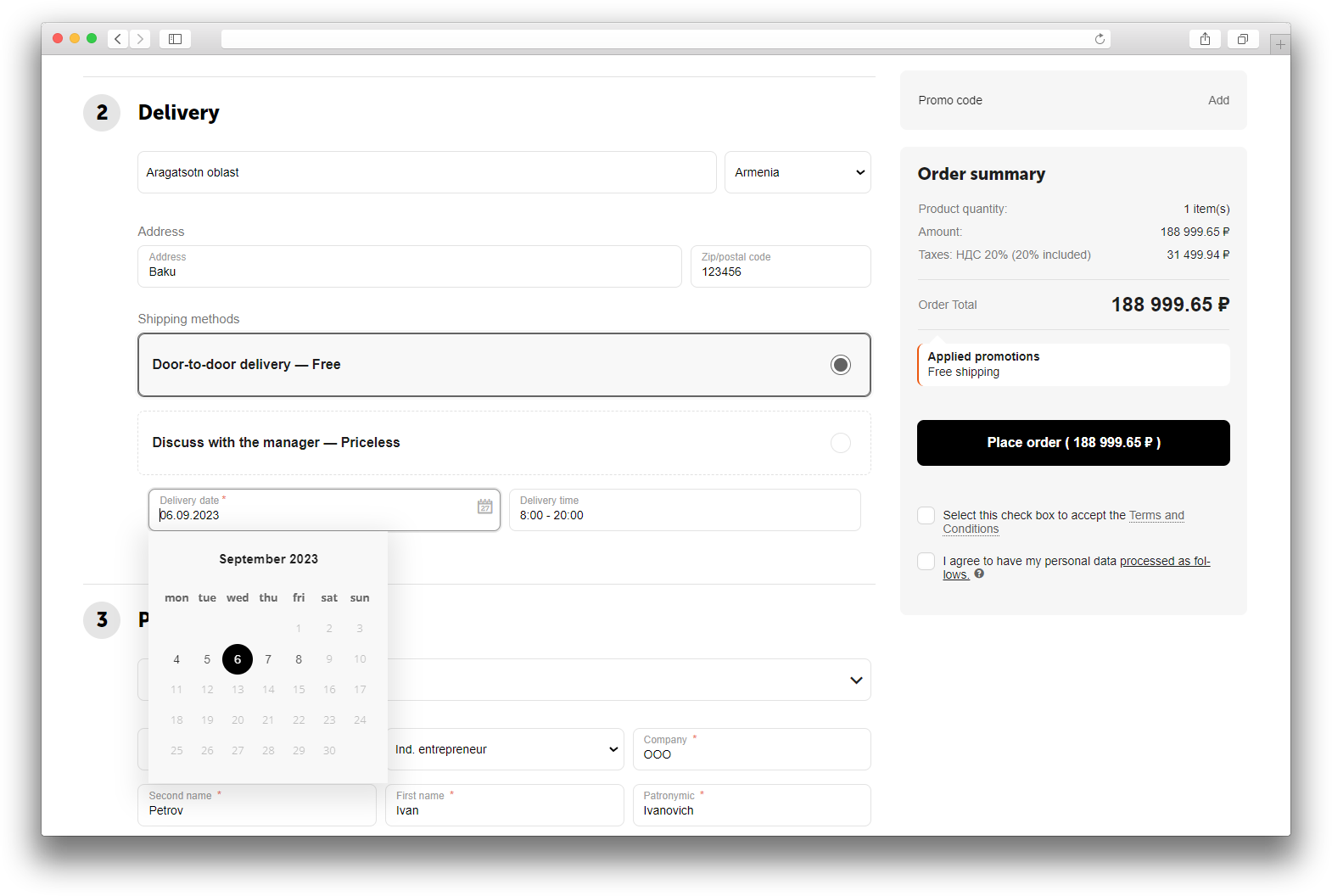
- to let customers choose a delivery date at checkout;
- to hide unavailable dates before the order is placed;
- to save the selected delivery date and time in the order and show it in order information.
Key features
- separate schedule settings for each shipping method;
- multiple time ranges for one weekday;
- a limit on how many days ahead the calendar can show;
- a limit based on the remaining time before delivery starts;
- date and time selection on checkout;
- delivery information shown in the order details;
- support for multiple suppliers in a single order.
How it works
The administrator sets up the schedule in the shipping method card, defines the availability in hours and the day limit, and enables date and time display on checkout. On the storefront, the customer sees only available dates and time slots, selects a suitable delivery time, and places the order. The selected values are saved in the order and displayed in order information.
Have questions about the add-on?
Product:
- Store Builder
- Store Builder Ultimate
- Multi-Vendor
- Multi-Vendor Plus
- Multi-Vendor Ultimate
Recipient:
- Buyers
- Owners
Localization:
- English
- Русский
Compatible versions:
- 4.19.X
- 4.18.X
- 4.17.X
- 4.16.X
- 4.15.X
- 4.14.X
- 4.13.X
- 4.12.X
- 4.11.X
- 4.10.X
Instructions for Delivery Schedule
What the add-on does
The add-on lets you define delivery availability schedules, limit dates by weekdays and time ranges, and show customers delivery date and time selection at checkout.
Where to find the add-on
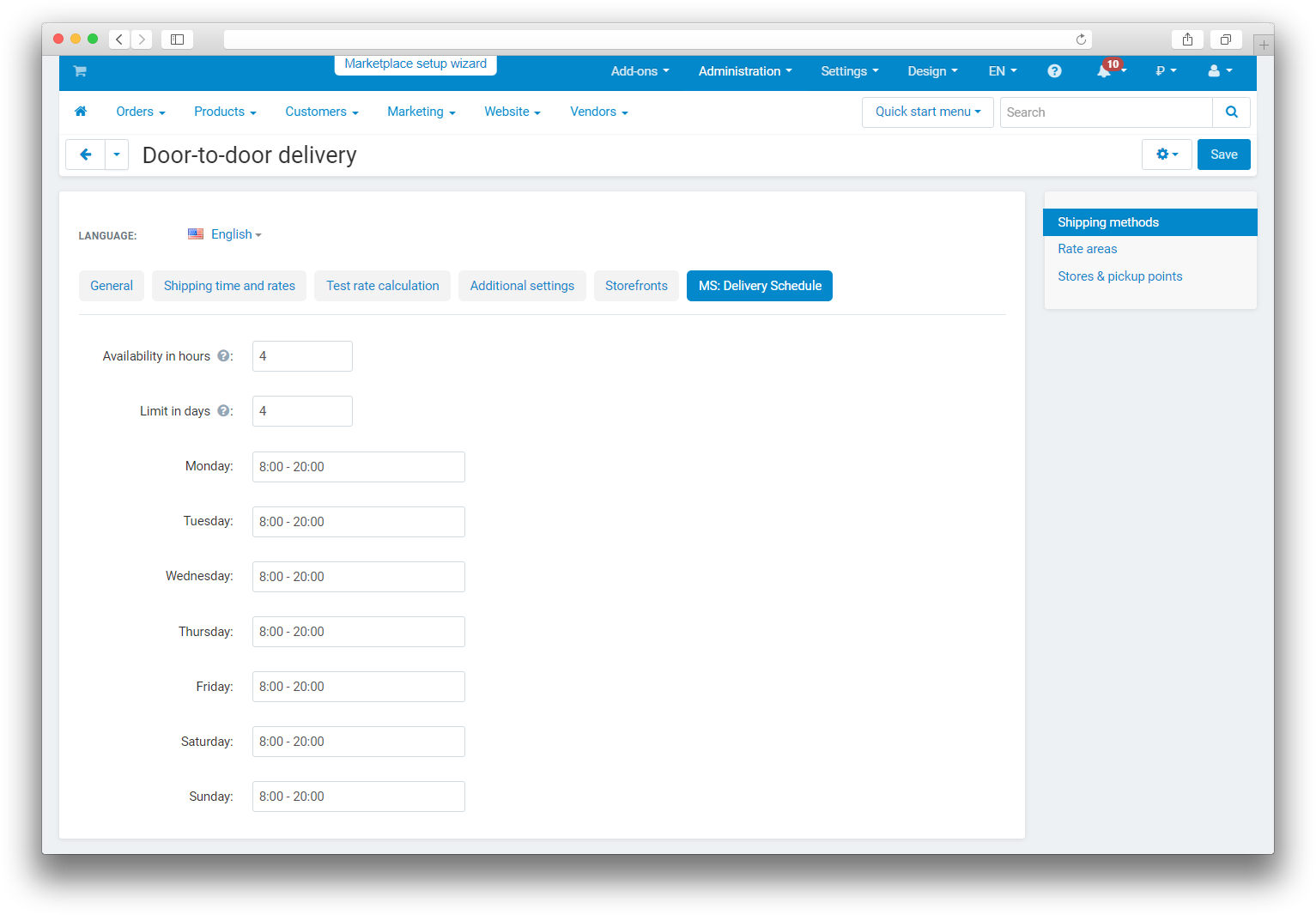
Configure the add-on in each shipping method card. Open Shipping methods, choose the required method, and find the MS: Delivery Schedule tab.
This tab is where you set time and day limits, enable date and time display at checkout, and fill in the weekly schedule.
How to configure it
- Open the required shipping method in the admin panel.
- Set Availability in hours if you need to limit dates based on the time left before delivery starts.
- Set Limit in days if the calendar should show only the nearest dates.
- Enable Show date in checkout if the customer should choose the delivery day.
- Enable Show time in checkout if the customer should choose a time slot.
- Add the weekday schedule and define one or more time ranges for each day.
- Save the shipping method.
How to check the result
- Open the storefront and go to checkout.
- Select the shipping method that has a schedule configured.
- Check that the calendar shows only available dates.
- If time selection is enabled, make sure the list of time slots matches the chosen weekday.
- Place a test order and check that delivery date and time were saved in the order.
- If multiple suppliers are used, confirm that the data is shown separately for each supplier.
Changelog
v1.5.1 from 27.08.2026
[*] Updated the add-on code, templates, and integration files.
[*] Updated the add-on description, instructions, changelog, and logo.
v1.5.0 from 2026-02-11
[+] Added support for multiple time ranges on each day of the week.
[!] Fixed a migration error.
v1.4.0 from 2026-01-19
[*] Aligned licensing, templates, and annotations with the standard.
v1.3.3
[!] Fixed delayed time-field updates after selecting a date.
v1.3.2 from 2025-08-14
[*] Moved storefront date and time display settings from the add-on settings to shipping settings.
v1.3.1 from 2024-12-09
[!] Fixed date saving after a redirect from checkout.
v1.3.0 from 2024-11-06
[+] Added compatibility with Multi-Vendor and the Vendors add-on.
[+] Extended order information to show the date for each vendor.
[*] Standardized language variables.
[!] Fixed errors in the Delivery schedule tab.
[!] Fixed various JavaScript issues and partially rewrote the functions.
v1.2.1 from 2023-08-29
[*] Standardized language variables.
[*] Updated the add-on icon.
v1.2.0 from 2023-08-14
[*] Added delivery-time information to orders.
[*] Standardized the add-on.
[*] Standardized the company logo.
[+] Added the add-on icon.
[*] Replaced short PHP tags with standard tags.
v1.1.0 from 2023-07-01
[+] Added licensing and add-on updates.
[*] Updated the changelog.
[!] Fixed time selection for each day of the week.
[!] Fixed the ability to leave time empty for non-working days.
[-] Removed README.md.
v1.0.1 from 2020-12-08
[!] Fixed a JavaScript issue.
v1.0.0 from 2020-11-12
[+] Initial release.
Legend:
[+] Added
[-] Removed
[*] Changed
[!] Bug fixed
Reviews
Светлана Полянская
Игорь Жданов