
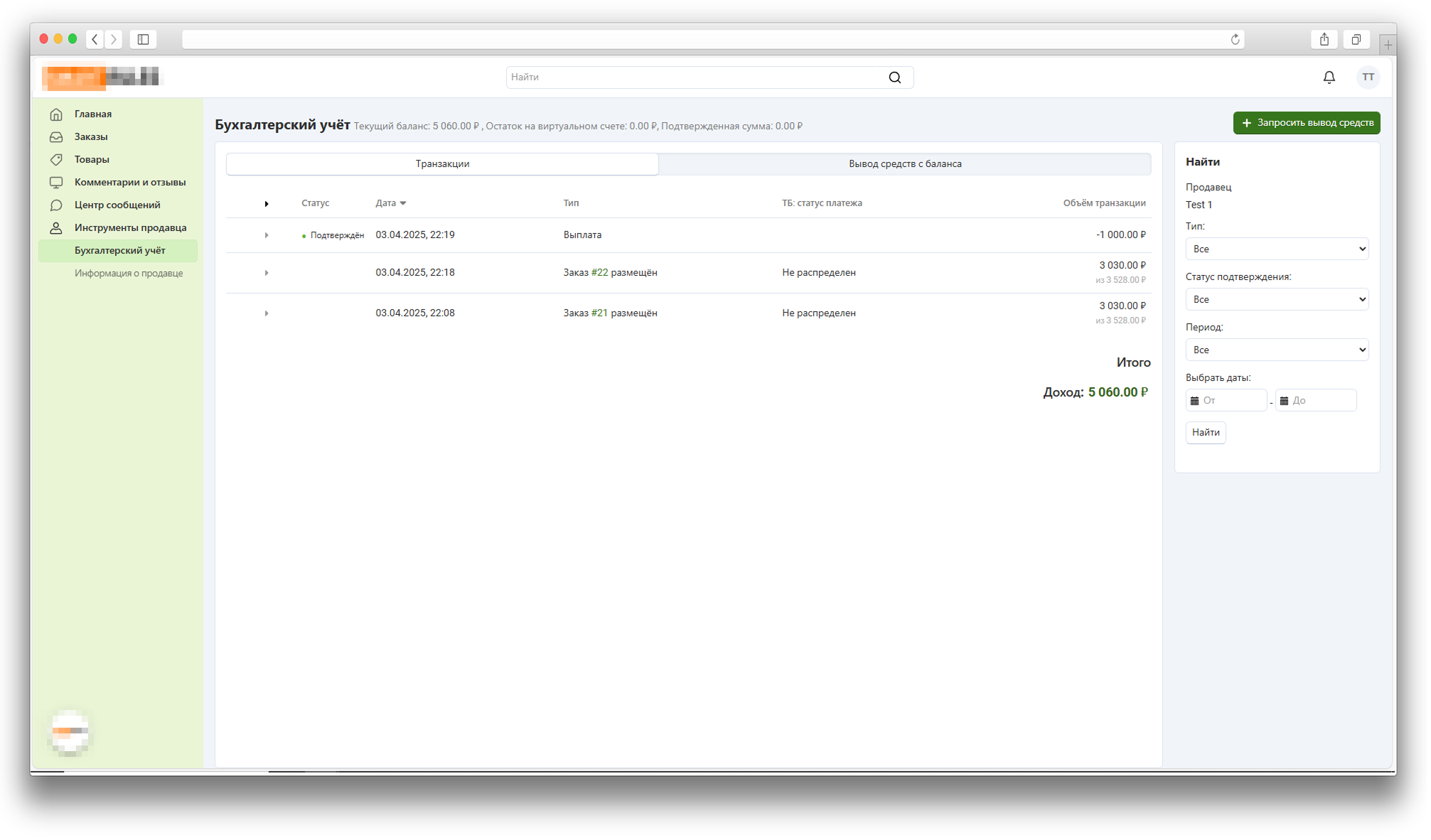


Tochka Bank Nominal Accounts
This add-on is part of our Subscription plan.
Subscribe once — enjoy all add-ons without limits.
“Tochka Bank Nominal Accounts” helps a CS-Cart Multi-Vendor marketplace work with payments, beneficiaries, virtual accounts, and vendor payouts through Tochka Bank integration. The administrator can see incoming payments, distribute amounts by orders, create payout deals, and control when funds become available according to hold rules and order statuses.
What it is for
The add-on is designed for marketplaces that accept payments through Tochka Bank and need to split received funds between vendors, the marketplace, shipping, and the acquiring fee. It reduces manual reconciliation, helps administrators find undistributed payments faster, and makes the money flow from buyer payment to vendor payout clearer.
Key features
- Connecting CS-Cart payment methods to the Tochka Bank settlement flow.
- Vendor beneficiary registration, update, activation, and deactivation.
- Support for legal entities, sole proprietors, self-employed vendors, and individuals.
- Mapping vendor profile fields to the data required for bank identification.
- Beneficiary document upload and virtual account creation.
- Beneficiary, document, virtual account, and vendor balance display.
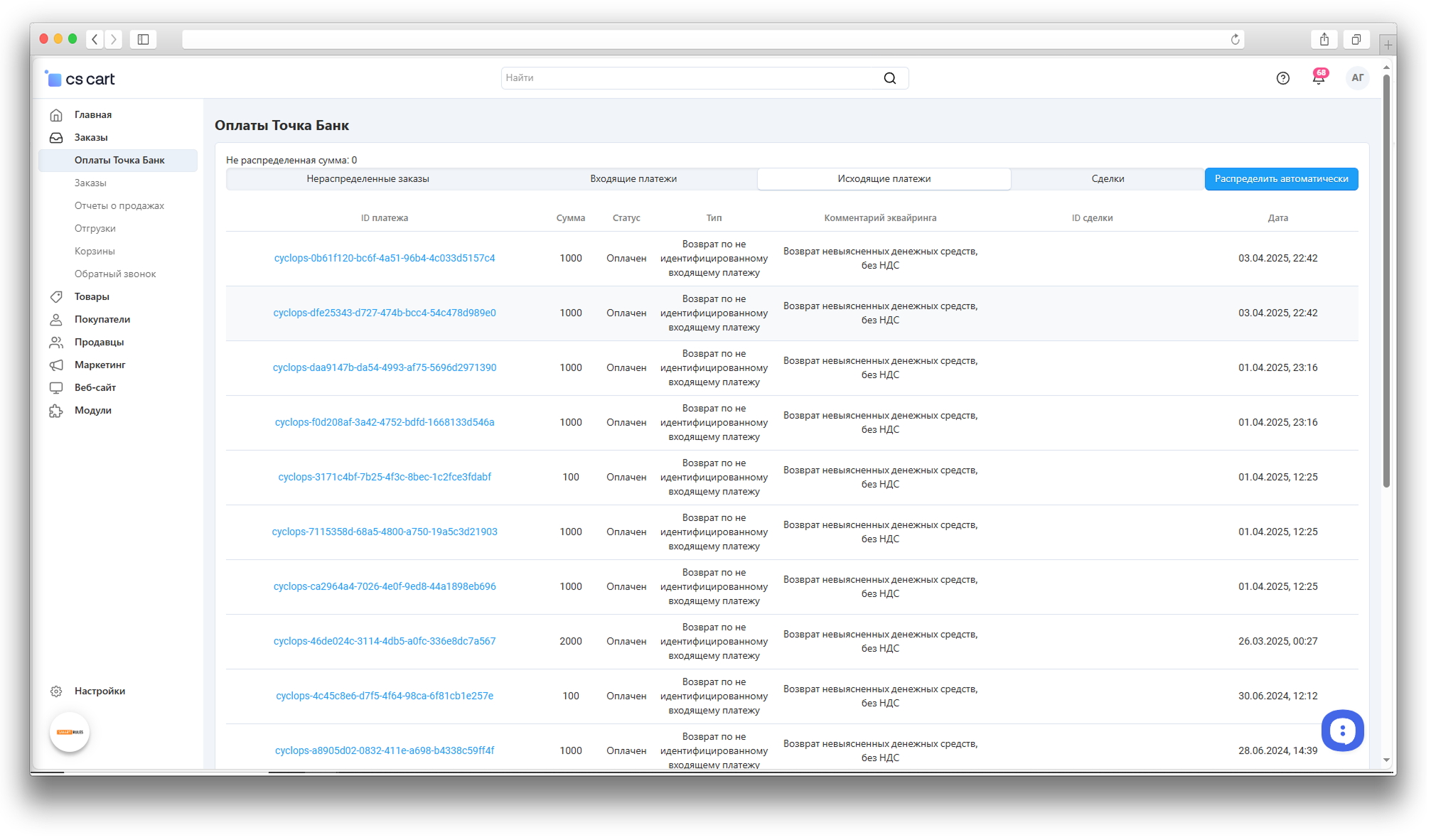
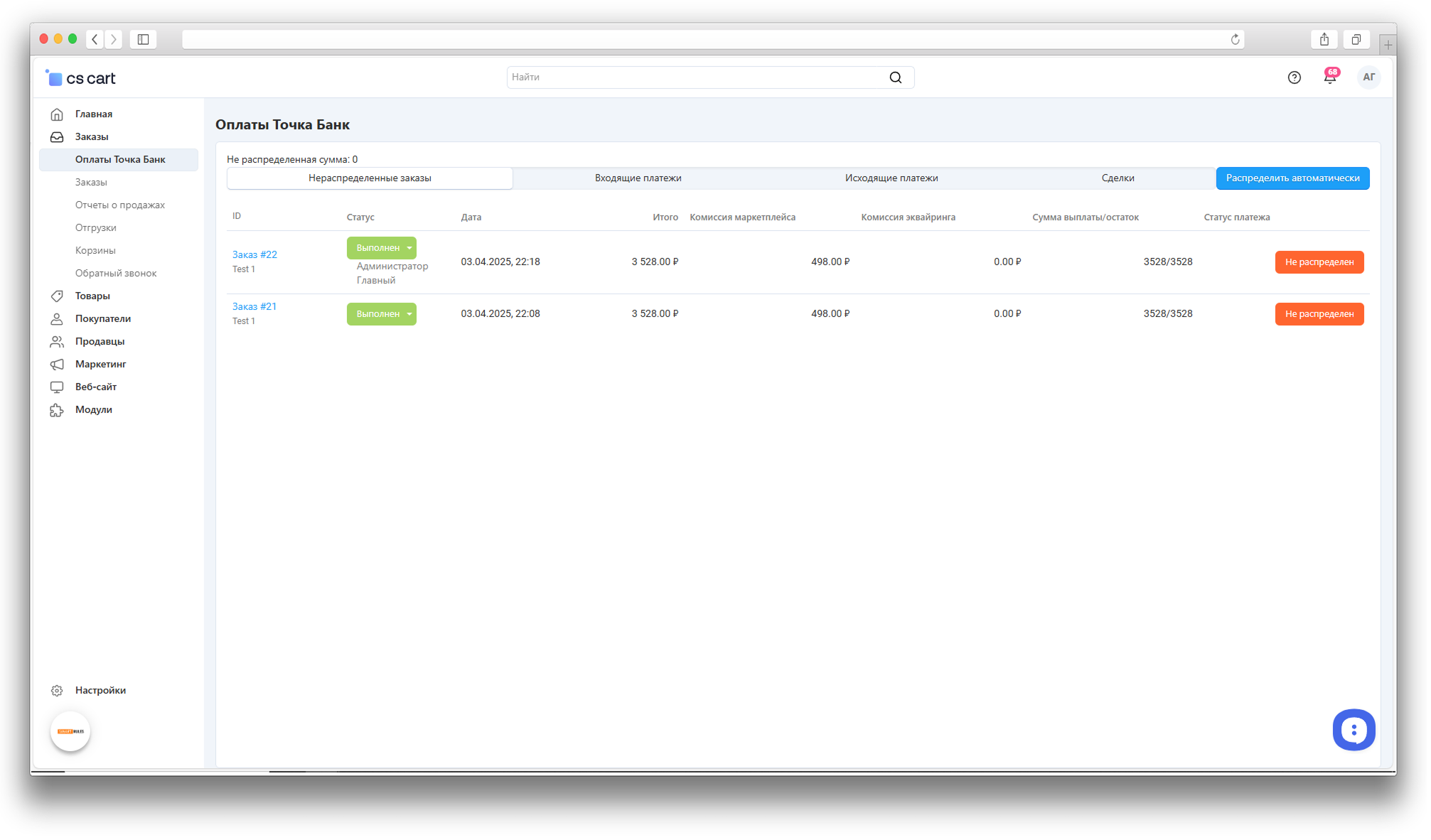
- Payments section with undistributed orders, incoming payments, outgoing payments, and deals.
- Automatic incoming payment distribution with products, shipping, marketplace commission, and acquiring fee taken into account.
- Choice of who pays the acquiring fee: the marketplace or the vendor.
- Creating, viewing, updating, executing, and rejecting payout deals.
- PDF documents for the beneficiary agreement and the deal attachment.
- Funds hold by period and by refundable order statuses.
- Test mode, connection check, key generation, test transfer, and logging.
How it works
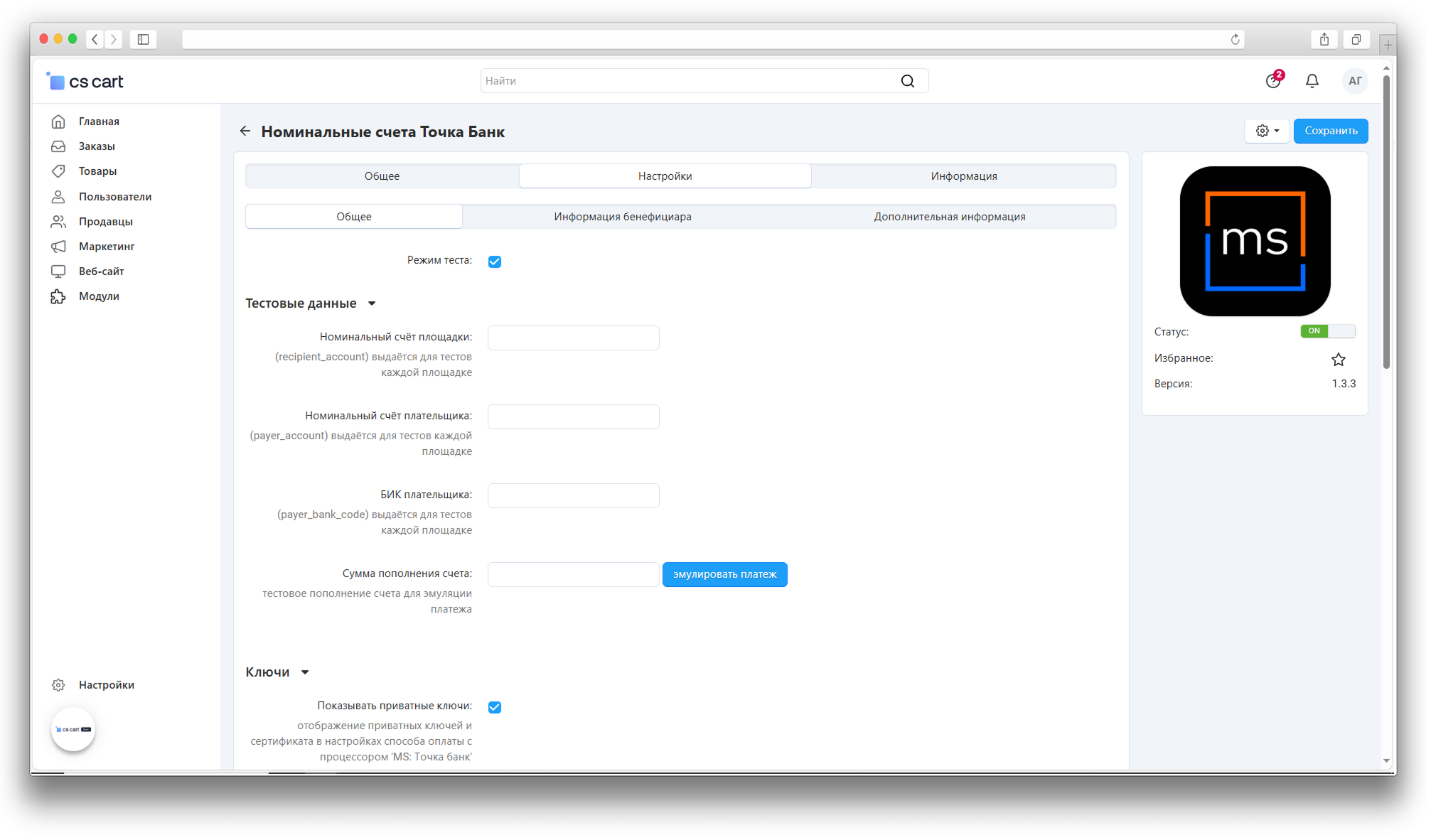
The administrator receives access from Tochka Bank, generates keys in the add-on settings, sends the certificate to the bank, and fills in the platform identifier, key thumbprint, nominal account, and bank code. Vendor profile fields are mapped to the data required by the bank: legal type, tax ID, bank details, full name, passport data, registration address, and tax residency values.
A “Tochka Bank” tab appears in the vendor profile. After the data is filled in, the add-on receives the beneficiary ID, uploads the document, and creates a virtual account. When buyer payments arrive at the bank, the administrator starts automatic distribution: the add-on matches payments with orders, calculates the vendor and marketplace shares, and takes shipping and acquiring fees into account.
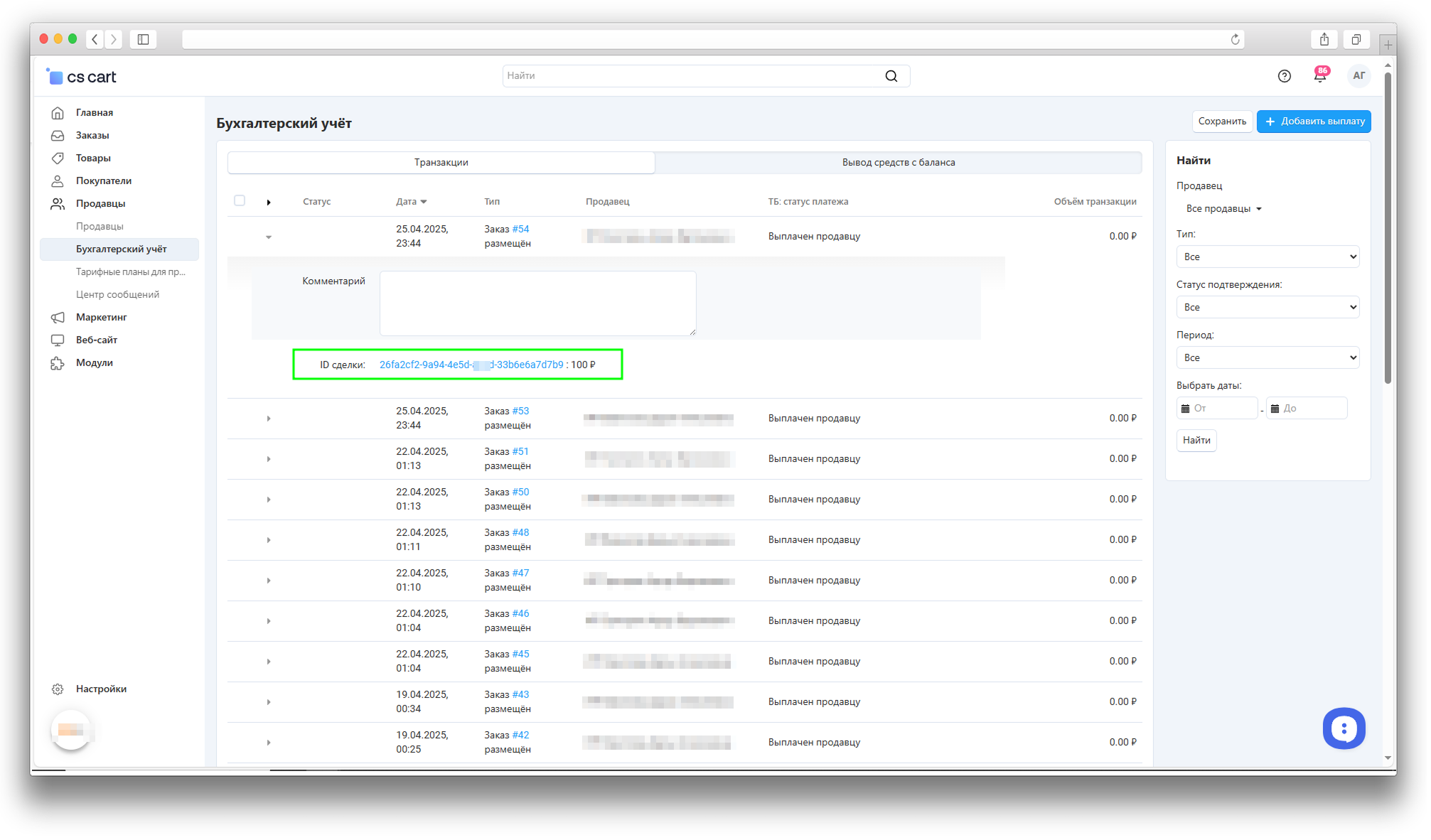
Vendor payouts use the CS-Cart accounting workflow: a withdrawal request creates a deal, a document is attached to the deal, and after the deal is executed the funds become available according to the configured hold rules.
Have questions about the add-on?
- Multi-Vendor
- Multi-Vendor Plus
- Multi-Vendor Ultimate
- Owners
- Vendors
- English
- Русский
- 4.21.X
- 4.20
- 4.19.X
- 4.18.X
- 4.17.X
Instructions for Tochka Bank Nominal Accounts
What the add-on does
The add-on connects a CS-Cart Multi-Vendor marketplace to Tochka Bank nominal account settlements. It helps register vendor beneficiaries, receive virtual accounts, distribute incoming payments by orders, create payout deals, and control when funds are available for withdrawal.
Documents are generated through the standard CS-Cart document mechanism. The add-on depends on the PDF Documents add-on.
Where to find the add-on
- Add-ons → Manage add-ons → Tochka Bank Nominal Accounts — connection, keys, beneficiary, distribution, and funds hold settings.
- Orders → Tochka Bank Payments — undistributed orders, incoming payments, outgoing payments, and deals.
- Vendors → Vendors → vendor profile → Tochka Bank — beneficiary data, documents, and vendor virtual account.
- Vendors → Accounting — withdrawal requests and payout deals.
- Administration → Payment methods — payment methods that participate in Tochka Bank settlements.
- Administration → Statuses → Order statuses — order status flags for distribution and payout confirmation.
Prepare Tochka Bank access
- Request test or production access from Tochka Bank and provide the store server IP address to the bank.
- Open the add-on settings, the General tab, and the Keys block.
- Click Generate keys. The add-on will fill in the public and private keys and prepare a certificate for the bank.
- Send the certificate file
var/ms_data/ms_tochka_bank/keys/rsaacert.pemto Tochka Bank. - After confirmation from the bank, fill in Platform identifier, Key thumbprint, Marketplace nominal account, and Marketplace bank code.
- Click Test connection. If the settings are correct, the add-on will show a successful status.
Private key fields are hidden by default. To view or edit them manually, use the Show private keys and Allow key editing settings.
Configure general settings
- In the Test data block, enable or disable Test mode.
- Fill in Marketplace nominal account and Marketplace bank code.
- If test transfers require separate payer details, fill in Payer account and Payer bank code.
- In Canceled order status, select the status that allows the full order amount to be transferred as marketplace commission.
- In Who pays acquiring, select Marketplace or Vendor. If Vendor is selected, the acquiring fee reduces the amount paid to the vendor. If Marketplace is selected, the acquiring fee remains in the marketplace share.
- In the Funds hold block, set the number of hold days. The value 0 disables time-based holding.
- In Refundable order statuses, select order statuses that should keep funds blocked regardless of the hold period.
- Enable logging and set the maximum log file size if operation logs are needed.
Configure vendor data
- Open Administration → Profile fields → Vendor information.
- Create or check fields for legal type, tax ID, company name, KPP, full name, birth date and place, passport data, passport subdivision code, registration address, registration country code, tax residency flag, bank code, and settlement account.
- For the legal type field, use J for a legal entity, I for a sole proprietor, and F for an individual or self-employed vendor.
- Open the add-on settings, the Beneficiary information tab, and map every vendor field to the corresponding add-on setting.
- If Profile fields in a separate tab is enabled, the mapped fields will appear in the vendor profile on the Tochka Bank tab. If it is disabled, the fields remain in the general vendor profile form.
- Configure automatic beneficiary activation and deactivation, and select the vendor status used during deactivation when the beneficiary has blocked funds.
- If needed, configure the default value and lock behavior for the TB: create deal field in accounting.
Configure payment methods and order statuses
- Open the payment method that should participate in Tochka Bank settlements.
- Enable the Use with Tochka Bank checkbox.
- Fill in Bank commission (%) if the acquiring fee should be included in distribution calculations.
- Open order statuses and enable TB: distribute funds for statuses whose orders should appear in the distribution list.
- Enable TB: order complete for statuses after which the vendor is allowed to request a withdrawal.
Register a vendor beneficiary
- Open the vendor profile and the Tochka Bank tab.
- Fill in the data mapped in the add-on settings.
- Click Get beneficiary ID or save the vendor profile.
- After a successful response, the add-on will fill in the beneficiary ID.
- If the beneficiary document has not been created yet, the add-on will generate and upload an agreement. If needed, you can upload a file manually in the document field.
- After the document is uploaded, the add-on will create and save the vendor virtual account.
- Check the links to beneficiary data, the document, and the virtual account. For sole proprietors, self-employed vendors, and individuals, document validation statuses are also displayed.
Distribute payments
- Go to Orders → Tochka Bank Payments.
- On the Undistributed orders tab, check orders whose amount has not been fully distributed yet.
- Click Distribute automatically. The add-on will receive new incoming payments, match them with orders, and distribute amounts to vendor virtual accounts.
- If the incoming amount is not enough to cover the full order, the order remains partially distributed and will be completed on the next run.
- Use the Incoming payments, Outgoing payments, and Deals tabs to monitor operations.
- If a canceled order status is selected in settings, the order page can transfer the full amount of such an order as marketplace commission.
The command for regular automatic distribution is shown on the Additional information tab in the add-on settings: php admin.php --dispatch=ms_tochka_bank.identity_payments. Run it at least once every 96 hours; otherwise unidentified payments may be returned to acquiring.
Withdrawals and deals
- Move the order to a status marked with TB: order complete.
- Open the vendor accounting area and create a withdrawal request.
- Make sure the TB: create deal field is enabled for the request.
- The root administrator approves the payout in accounting. On approval, the add-on creates a deal, attaches a document, and tries to execute the deal.
- If the bank returns an error, the payout is declined with the reason text. Fix the vendor, order, or deal data and repeat the action.
- On the Deals tab, you can open a deal, update data, execute it, or reject it if the current status allows the action.
- Available funds are shown with the hold rules applied: while the deal is not executed, the order has a refundable status, or the hold period has not ended, the amount remains unavailable.
Deactivate a beneficiary
- If automatic deactivation is enabled, the add-on checks the beneficiary virtual account when a vendor is disabled.
- If there are no available funds, the add-on deactivates the beneficiary.
- If there is an available balance, the add-on tries to transfer funds to the vendor settlement account.
- If there are blocked funds, the vendor is moved to the status selected in deactivation settings and the administrator receives a notification.
How to check the result
- Enable test mode, fill in test requisites, and run Test connection.
- Run a test transfer in the add-on settings.
- Create a test vendor, fill in the Tochka Bank tab, and get the beneficiary ID.
- Check that the beneficiary document and virtual account appear for the vendor.
- Create a test order with a payment method marked for Tochka Bank and move it to a distribution status.
- Open Orders → Tochka Bank Payments, click Distribute automatically, and check the vendor, marketplace, shipping, and acquiring amounts.
- Move the order to a completed status, create a withdrawal request, and check that a deal is created.
- Check that funds are shown as blocked or available according to the hold settings.
Troubleshooting
- Connection test fails. Check keys, key thumbprint, platform identifier, nominal accounts, bank codes, and the IP address agreed with the bank.
- Beneficiary is not created. Check the vendor legal type, required fields, and profile field mapping in the add-on settings.
- Virtual account does not appear. Check that the beneficiary is created, the beneficiary document is uploaded, and the vendor profile contains a tax ID.
- Order does not appear in distribution. Check the payment method, the Use with Tochka Bank checkbox, and the order status marked with TB: distribute funds.
- Payout deal is not created. Check the vendor virtual account, beneficiary ID, bank code, settlement account, and the TB: create deal field in the payout.
- Funds are not available for withdrawal. Check the deal status, refundable order status, and hold period in the add-on settings.
- Documents are not generated. Check that the PDF Documents add-on is active and document templates are available in admin.
Changelog
v1.11.1 from 30.09.2026
[*] Updated the add-on code, templates, and integration files.
[*] Updated the add-on description, instructions, and changelog.
v1.11.0 from 2026-06-02
[+] Added:.
[+] Tochka Bank payment distribution history in orders and on the add-on payments page.
[*] A clear notification when the marketplace is disconnected from the Tochka Bank system.
[*] Improved reliability of payment distribution and deal operations.
[*] Improved beneficiary activation and deactivation handling.
[*] Strengthened protection for service files, logs, and admin actions.
[*] Improved payment error and type display on the add-on payments page.
[!] Fixed:.
[*] Issues in test payment and automatic distribution scenarios.
v1.10.0 from 2026-05-25
[+] Added:.
[*] Expanded payment and order amount statistics.
[*] Control over funds available for withdrawal.
[*] Improved payment distribution between vendors and the marketplace.
[*] Improved the table layout on payment and deal pages.
[+] Brought the add-on in line with the current project template.
[*] Updated add-on materials and admin language files.
[!] Fixed:.
[*] Passport subdivision code submission in the XXX-XXX format.
[*] Vendor data being cleared after a Tochka Bank API error.
v1.9.0 from 2026-04-24
[!] Fixed:.
[*] A hang when disabling a vendor with no Tochka Bank data in the vendor profile.
v1.8.0 from 2026-04-17
[+] Added:.
[+] Support for the new sole proprietor, self-employed, and individual registration flow.
[*] Beneficiary document data and validation statuses on the vendor page.
[*] Mappings for passport subdivision code, passport issuer, registration address, and registration country code.
[*] Updated beneficiary creation and update logic for sole proprietors and individuals.
[*] Updated the add-on description, instructions, changelog, and translations.
[!] Fixed:.
[*] Registration address and passport series no longer turn into 0 when vendor string fields are processed.
v1.7.0 from 2026-04-01
[+] Added:.
[*] A PDF deal document in invoice format for attaching to a Tochka Bank deal.
[*] A beneficiary offer agreement document.
[*] Automatic beneficiary document upload and virtual account creation after beneficiary creation.
v1.6.0 from 2026-03-02
[+] Added:.
[*] Asynchronous beneficiary deactivation with status polling and completion notification.
[*] A table for tracking beneficiary deactivation jobs.
[+] Brought the add-on in line with the project template.
[+] Moved add-on files to a dedicated store data directory.
v1.5.0 from 2026-01-22
[+] Added:.
[*] Beneficiary status and activation/deactivation buttons on the vendor edit page.
[*] Transfer of vendor requisites and account data fields.
[*] Updated certificate generation according to Tochka Bank recommendations.
v1.4.0 from 2025-05-12
[+] Added:.
[*] The add-on logo and an updated icon.
[*] Handling for the response that a beneficiary is already active.
[+] Standardized the add-on code and text files.
[*] Changed the private key retrieval method for requests.
[!] Fixed:.
[*] Fund distribution.
[+] The key file path shown in add-on settings.
[*] KPP transfer when changing the vendor payment status.
v1.3.2 from 2024-04-12
[+] Added:.
[*] Vendor balance display on the Vendors page.
[*] Settings for the “TB: create deal” checkbox on the accounting page.
[*] An option to deduct the acquiring commission from the marketplace commission in favor of the vendor payout.
[!] Fixed:.
[+] Payment status display on the order page; added the “partially distributed” status.
[*] Beneficiary creation no longer sends the vendor settlement account instead of the marketplace nominal account.
v1.3.1 from 2023-11-29
[+] Added:.
[*] The “Middle name” field and payment and deal identifiers for the root administrator.
[*] Payment information on the order page.
[*] Error display when deal creation fails.
[*] Withdrawal of the full order value minus the acquiring fee as marketplace commission.
[*] The “TB: distribute funds” order status setting for selecting unverified orders.
[*] Replaced short PHP tags with standard syntax.
[!] Fixed:.
[*] Refresh of the undistributed payments page after automatic distribution.
v1.3.0 from 2023-06-10
[+] Added:.
[*] A payment method checkbox for participation in the Tochka Bank integration.
[*] A link for downloading the .pem key file.
[+] A button for crediting a test account in add-on settings.
[+] The total undistributed amount on the add-on payments page.
[*] Tabs with transaction and deal lists.
[*] Fund withdrawal by beneficiaries.
[+] Display of private keys and the certificate in add-on settings.
[*] Updated the payouts page.
[*] Changed where the .pem key file is saved.
v1.2.1 from 2023-04-25
[!] Fixed:.
[-] Removed extra commas in the code.
v1.2.0 from 2023-02-02
[+] Completely reworked the add-on.
v1.1.0 from 2022-04-04
[+] Reworked the add-on.
Legend:
[+] Added
[-] Removed
[*] Changed
[!] Bug fixed
Here you can share your opinion and evaluate our work.
Your feedback helps us become better and offer you even better service.