![[MakeShop.pro] Import and export product tags, image](https://makeshop.pro/images/detailed/2/Group_6.svg "[MakeShop.pro] Import and export product tags, image")

Import and Export Product Tags
This add-on is part of our Subscription plan.
Subscribe once — enjoy all add-ons without limits.
Import and Export Product Tags adds dedicated tag data exchange operations to CS-Cart. It lets an administrator export current tag links for products and pages, edit them in an external file, and import the result back into the store.
What it is for
The add-on is useful when tags are used for navigation, filtering, SEO, or internal catalog labeling and manual maintenance becomes inconvenient. It brings tag management into the standard CS-Cart import and export workflow, so bulk changes can be handled through a familiar CSV process.
Key features
[+] Export tag links for store objects to a separate file.
[+] Import tags and their object links back into CS-Cart.
[+] Multi-Vendor company support through the Company field.
[+] Option to skip creating new tags during import when only existing values should be used.
[+] Separate SEO tag data schema when a compatible SEO for tags add-on is installed.
How it works
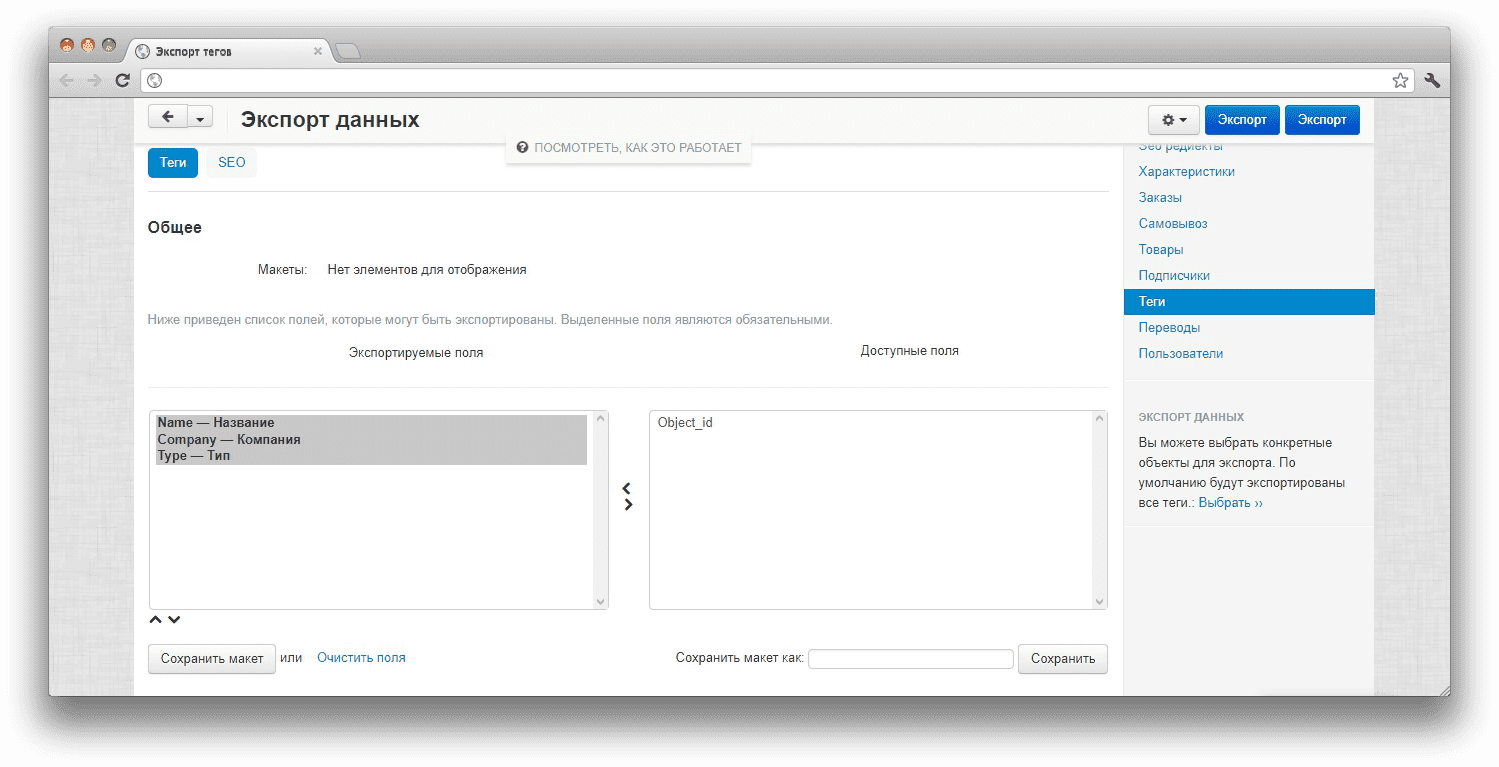
After installation, a Tags section appears in the import and export menus. During export, CS-Cart creates a file with the tag name, company, object ID, and object type. During import, the add-on matches file rows with existing tags, creates missing tags when the option allows it, and updates tag links for store objects.
SEO data is handled through a separate schema: when a compatible SEO for tags add-on is active, the exchange can include H1, description, title, meta description, meta keywords, and language fields.
Have questions about the add-on?
- English
- Русский
- 4.18.X
- 4.17.X
- 4.16.X
- 4.15.X
- 4.14.X
- 4.13.X
- 4.12.X
- 4.11.X
- 4.10.X
- 4.9.X
Instructions for Import and Export Product Tags
What the add-on does
The add-on adds dedicated tag operations to the standard CS-Cart import and export area. It can export tag links for store objects, let you edit the data in an external file, and import the result back into the store.
The basic exchange fields are: Name — tag name, Company — company ID in Multi-Vendor, Object_id — ID of the object linked to the tag, and Type — object type.
A separate schema is available for tag SEO data. If a compatible SEO for tags add-on is installed and active, the exchange can include H1, description, page title, meta description, meta keywords, and language fields.
Where to find the add-on
The main actions are available in the CS-Cart administration panel:
Administration → Import data → Tags — import tags and tag links from a file.
Administration → Export data → Tags — export tags and tag links to a file.
In Multi-Vendor, tag import and export menu items are hidden for the vendor panel and remain available to the marketplace administrator.
Exporting tags
1. Open Administration → Export data → Tags.
2. Select the fields to export. For basic exchange, use Name, Company, Object_id, and Type.
3. Run the export.
4. Check the generated file: it should contain rows with tag names and the objects they are linked to.
Importing tags
1. Prepare an import file in the format used by the standard CS-Cart import tool.
2. Fill in Name, Company, Object_id, and Type.
3. Open Administration → Import data → Tags.
4. Upload the file and map file columns to import fields.
5. Configure Skip creating new tags: when enabled, missing tags are not created; when disabled, missing tags are created automatically and then used for links.
6. Run the import and check the result in the tag list and on linked objects.
Tag SEO data
The SEO data schema is only needed for stores that use a compatible SEO extension for tags. In this case, additional SEO fields can be exchanged: H1, description, title, meta description, meta keywords, and language.
If the SEO extension is not installed or is disabled, these additional fields are not included in the exchange.
How to check the result
1. Create or select a test tag and link it to a store object.
2. Run export through Export data → Tags.
3. Make sure the file contains a row with the expected tag, company, object ID, and object type.
4. Edit the file: add a new test tag or change a link.
5. Run import through Import data → Tags.
6. Check that the tag was created or the link was updated according to the file.
7. Check Skip creating new tags separately: when the option is enabled, missing tags must not be created automatically.
File preparation notes
Tag names should match the values you want to have in the store. In Multi-Vendor, fill in Company correctly so that the tag belongs to the right company. Object_id and Type must point to an existing store object. Before a bulk import, test the file on a few rows first.
Change history
v1.2.3 from 2023-08-07
[*] Standardized the add-on
v1.2.2 from 2020-01-28
[!] Fixed an issue from task 7794
Legend:
[+] Added
[-] Removed
[*] Changed
[!] Bug fix
Here you can share your opinion and evaluate our work.
Your feedback helps us become better and offer you even better service.