


This add-on is part of our Subscription plan.
Subscribe once — enjoy all add-ons without limits.
Time Until Gift
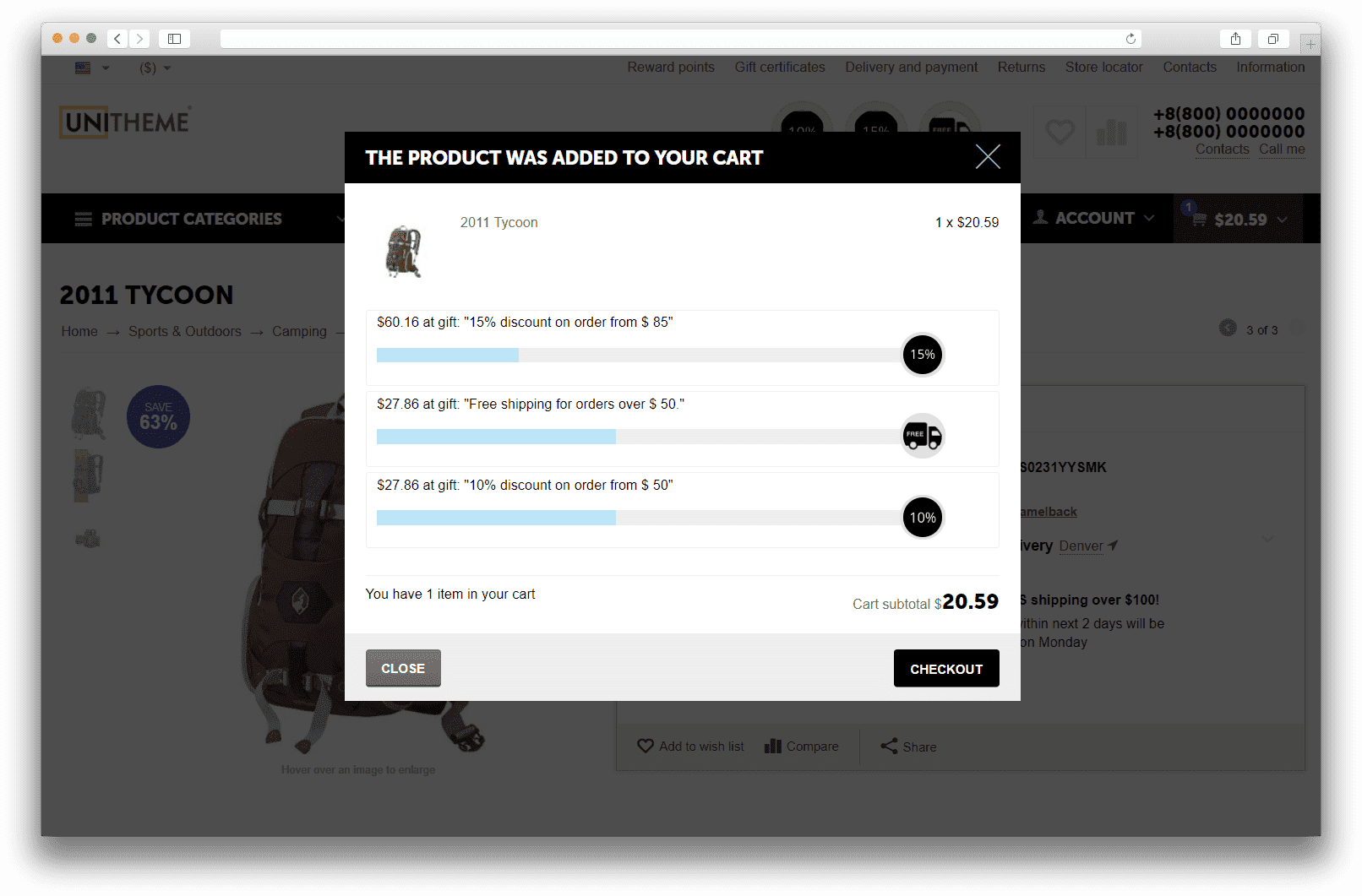
The add-on helps shoppers clearly see how much is left before they receive a bonus from a promotion. It shows progress toward the gift in the cart, in the add-to-cart popup, and in storefront blocks so the promotion stays visible and encourages a larger order.
What it is for
The add-on is designed for cart promotions where a customer receives a gift or another bonus after reaching the required order subtotal or product quantity. Instead of leaving promotion conditions hidden, it shows the current progress and the remaining value until the next bonus right during shopping.
This makes the promotion easier to understand, improves customer engagement, and gently helps increase average order value.
Key features
- shows how much is left until the next promotion bonus;
- supports cart promotions with conditions based on order subtotal and product quantity;
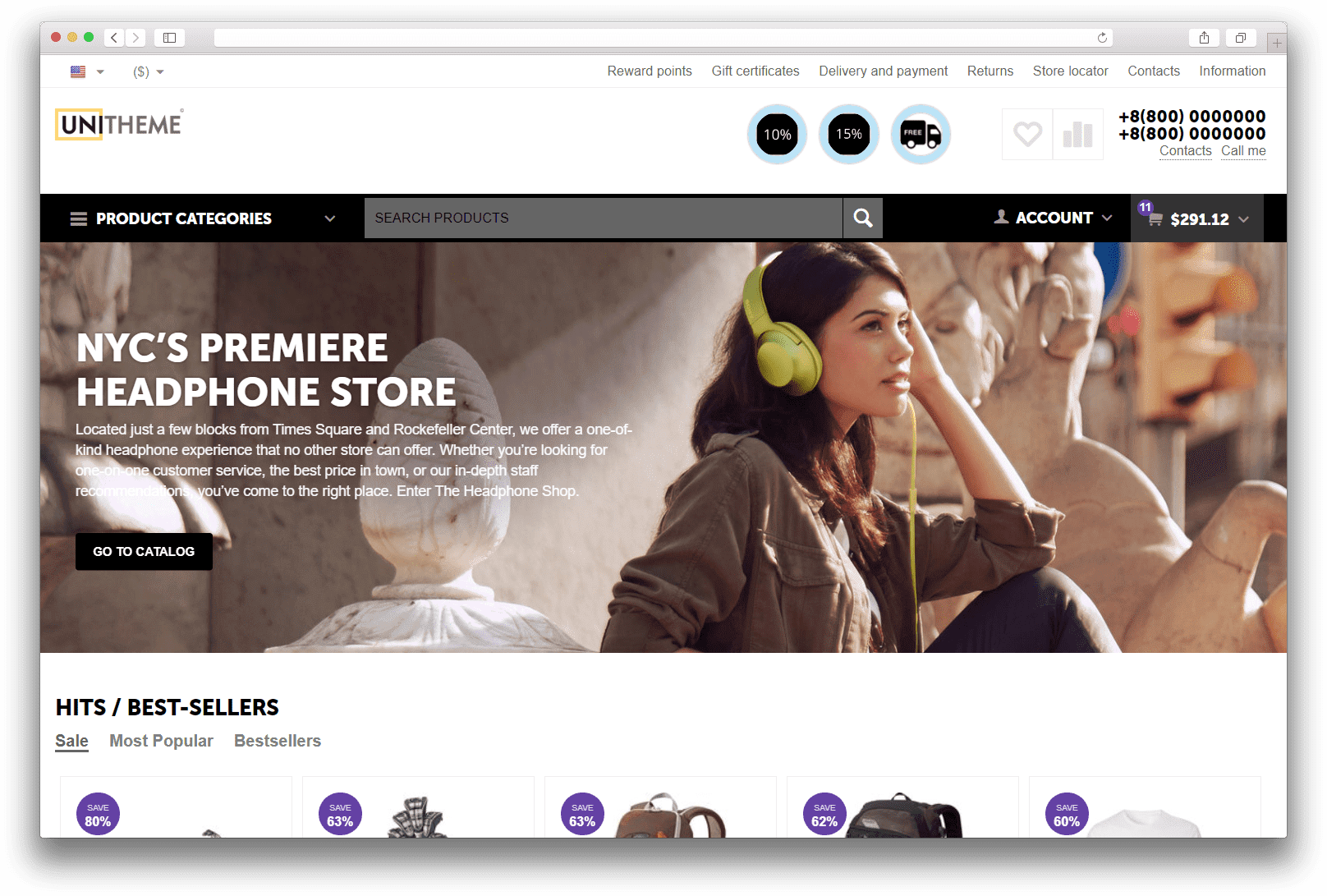
- displays progress in the cart, in the add-to-cart popup, and in storefront blocks;
- lets you set a separate storefront title for a promotion;
- supports a promotion image and several block display templates;
- can automatically choose the nearest promotion for the compact progress bar.
How it works
First, the administrator configures a cart promotion and enables its visibility for the add-on. After that, the add-on calculates customer progress according to the supported condition, builds the list of available promotions, and passes it to storefront blocks.
You can use a regular, consolidated, single, circular, or compact progress bar layout. If the store previously used legacy blocks of the older type, the add-on migrates them to the current format during the update without manual layout rebuilding.
Have questions about the add-on?
- Store Builder
- Store Builder Ultimate
- Multi-Vendor
- Multi-Vendor Plus
- Multi-Vendor Ultimate
- Buyers
- English
- Русский
- 4.20
- 4.19.X
- 4.18.X
- 4.17.X
- 4.16.X
- 4.15.X
- 4.14.X
- 4.13.X
- 4.12.X
Instructions for Time Until Gift
What the add-on does
The add-on tracks cart promotions and shows customers their progress toward the next bonus. It supports conditions based on order subtotal and product quantity, calculates the remaining value until the bonus, and passes this data to storefront blocks, the mini cart, and the add-to-cart popup.
For each promotion, you can enable a dedicated notification, define a storefront title, and upload an image. If the store still has legacy csc_promo_progressbar blocks, the add-on migrates them to the current MS: Time Until Gift block type during the update.
Where to find it
- Marketing → Promotions, where the MS Time Until Gift tab appears on the promotion page.
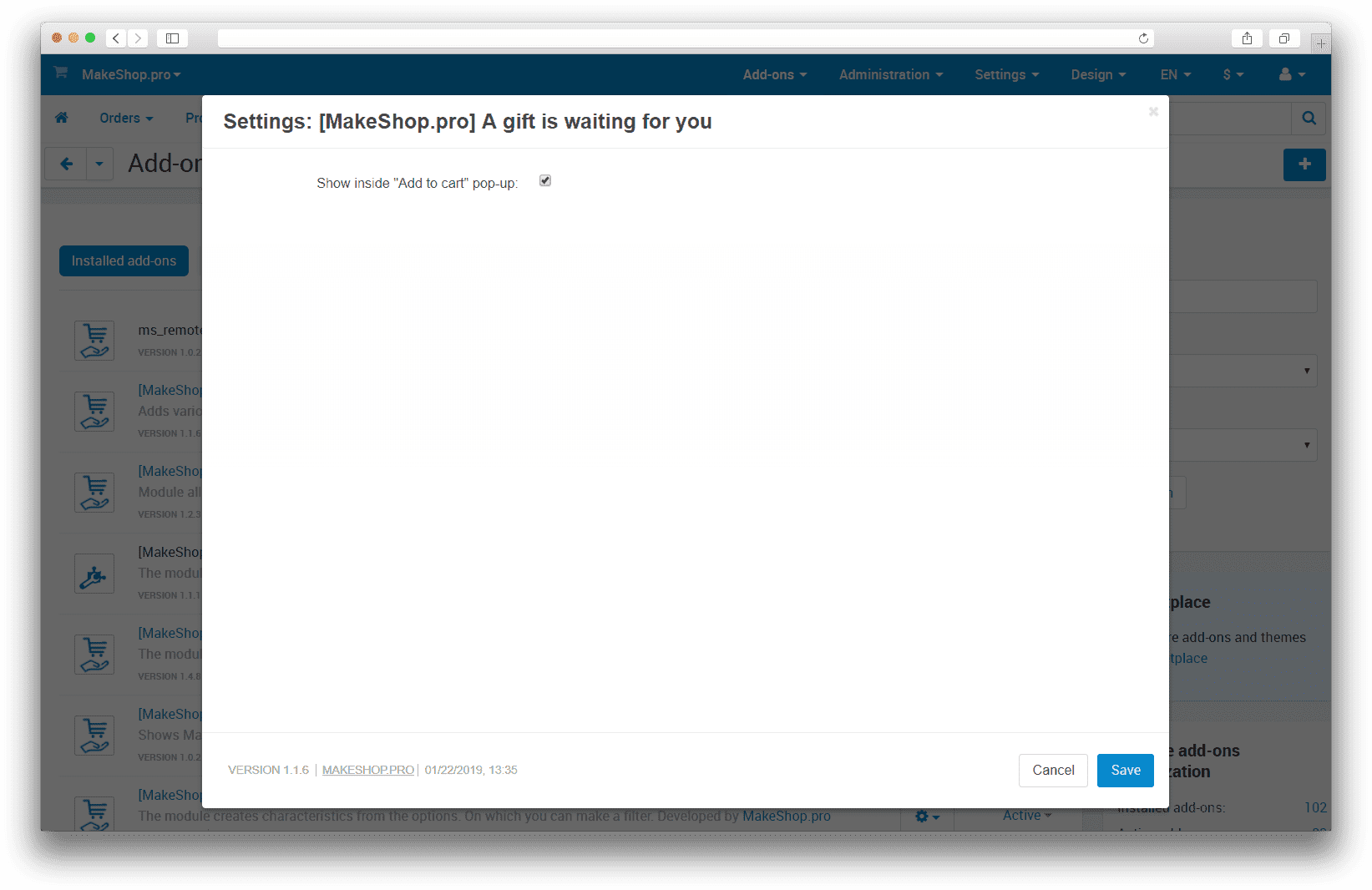
- Add-ons → Time Until Gift → Settings, where you configure display in the add-to-cart popup and the compact progress bar in the cart.
- Design → Layouts, where you add the MS: Time Until Gift block and select its template.
How to configure a promotion
- Open Marketing → Promotions and create or edit a cart promotion.
- Make sure the promotion is active and its availability period is suitable for testing.
- On the Conditions tab, add one of the supported rules, for example Order subtotal >= 1000 or Number of products in cart >= 3.
- On the Bonuses tab, configure the gift or another bonus that should become available after the threshold is reached.
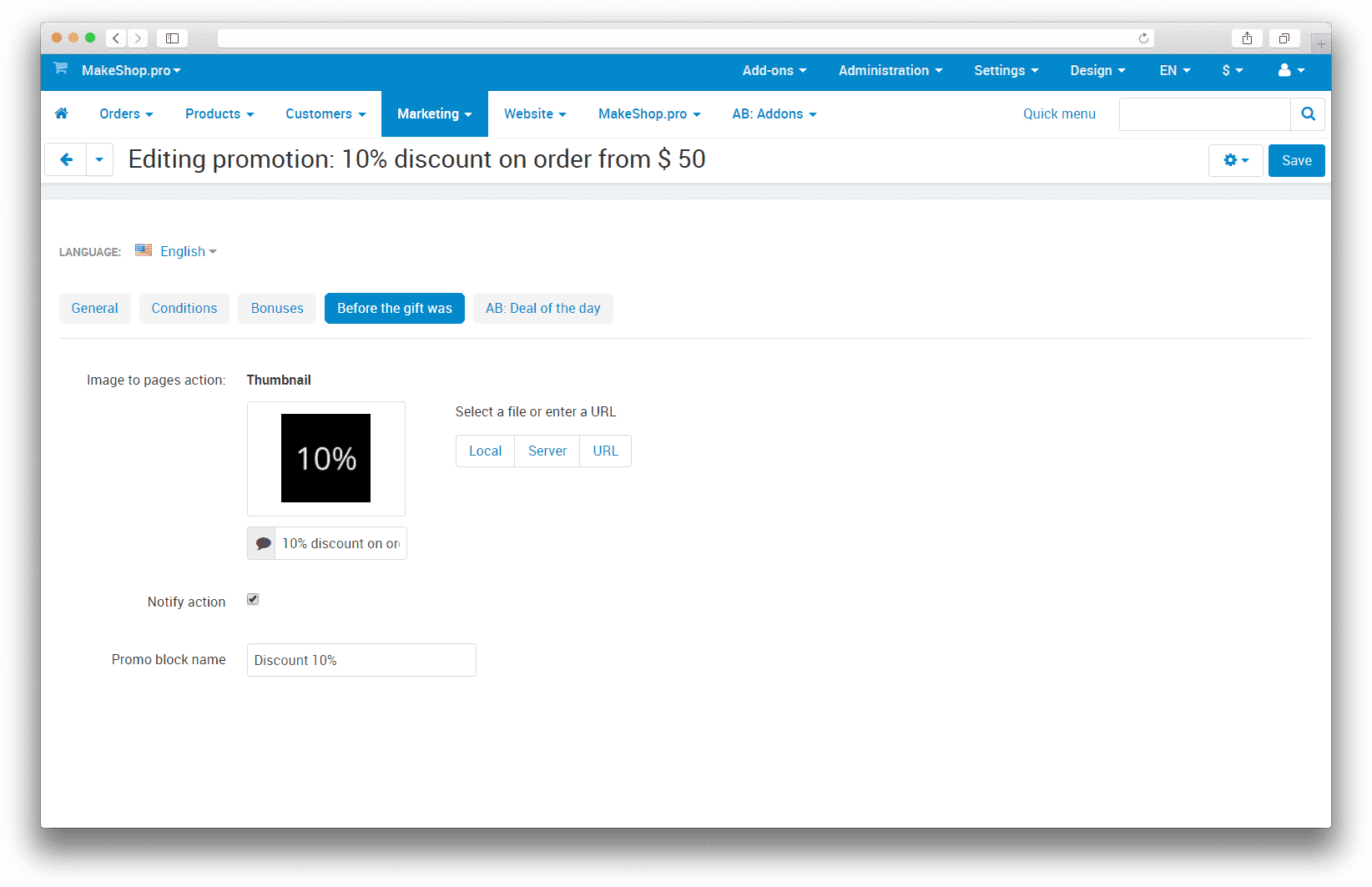
- On the MS Time Until Gift tab, enable Show promotion notification.
- If needed, fill in Storefront promotion title. If this field is empty, the regular promotion name is used.
- If needed, upload the Image for the promotion page used in storefront templates.
How to configure the add-on
- Open Add-ons → Time Until Gift → Settings.
- Enable Show inside "Add to cart" pop-up if you want to display progress immediately after a product is added.
- Enable Show compact progress bar in the cart if the cart should display a compact indicator for the nearest promotion.
- Save the settings.
How to place the block on the storefront
- Open Design → Layouts.
- Add the MS: Time Until Gift block to the required page area, most often the cart page or another checkout-related area.
- Select the block template according to the desired display scenario.
- Normal block, shows progress for several promotions within one main metric.
- Consolidated block, shows bonuses already available and those still ahead.
- Single block, shows one selected promotion.
- Circular block and Circular short block, compact one-promotion layouts.
- Compact progress bar, a narrow indicator for the nearest promotion that can work automatically or for a specific selected promotion.
For templates that work with one promotion, the block settings include the Promotion field. The list contains only cart promotions with the Show promotion notification option enabled.
Limitations and important conditions
- The add-on works only with cart promotions. Catalog promotions are ignored.
- Automatic progress calculation is supported for order subtotal and product quantity conditions.
- If a promotion zone is not Cart, the add-on cannot use it in storefront blocks.
- If Show promotion notification is disabled for a promotion, it will not appear in the block selector.
How to verify that it works
- Create a test cart promotion with a bonus and a condition based on order subtotal or product quantity.
- Enable Show promotion notification for it and optionally define a storefront title.
- Place the MS: Time Until Gift block on the cart page or enable display inside the add-to-cart popup.
- Add products to the cart below the threshold. The storefront must show how much is left until the bonus.
- Increase the subtotal or product quantity to the threshold. The add-on must show that the bonus is now available.
- If a single-promotion template is used, verify that the required promotion is selected in the block settings.
What to check if a promotion is not shown
- The promotion is created as a cart promotion, not a catalog promotion.
- The promotion period is active.
- The Show promotion notification option is enabled on the MS Time Until Gift tab.
- The promotion conditions use a supported metric, either subtotal or product quantity.
- CS-Cart cache has been cleared if the storefront does not refresh the block immediately.
Change history
v1.4.0 from 2026-04-16
[*] Added support for progress calculation by product quantity in the cart alongside order subtotal
[*] Updated progress output in storefront blocks, the cart, and the add-to-cart popup
[*] Improved labels, hints, and instruction texts for promotion and block setup
[!] Fixed the promotion list in block settings so it now keeps only supported cart promotions
[!] Improved the stability of progress calculation, migrations, and add-on behavior during installation and update
v1.3.0 from 2026-04-10
[*] Updated the add-on description, instructions, and changelog structure
[*] Brought the add-on in line with the current template and project standards
[!] Fixed cleanup of promotion images after deletion
[!] Fixed storefront logic issues caused by incomplete cart data, promotion conditions, and unavailable external SEO tables
v1.2.0 from 2026-01-19
[*] Standardized add-on structure, templates, and localization
v1.1.13 from 2023-01-01
[*] Replaced short PHP tags with standard <?php tags
v1.1.12 from 2022-12-26
[*] Standardized the add-on
v1.1.11 from 2022-10-09
[*] Standardized the add-on
v1.1.10 from 2021-01-12
[!] Fixed add-on issues
v1.1.9 from 2020-05-30
[!] Fixed add-on issues
v1.1.8 from 2020-05-15
[!] Fixed an installation issue
v1.1.7 from 2019-09-26
[*] Added compatibility with CS-Cart 4.10.x
v1.1.6 from 2019-02-17
[*] Improved the add-on layout
v1.1.4 from 2018-12-17
[*] Updated the add-on description and translations
Legend:
[+] Added
[-] Removed
[*] Changed
[!] Bug fix
Here you can share your opinion and evaluate our work.
Your feedback helps us become better and offer you even better service.