Борис Ж.


This add-on is part of our Subscription plan.
Subscribe once — enjoy all add-ons without limits.
Shipping as marketplace commission
The add-on lets a marketplace include the cost of shipping in its commission when calculating vendor payouts, instead of treating it as part of the payout amount.
What it is for
It is designed for marketplaces that retain the cost of particular shipping methods as marketplace income. The option is configured per shipping method, so regular delivery can be separated from delivery paid for or retained by the marketplace.
Key features
- Adds the “Use as marketplace commission” option to a shipping method.
- Includes shipping cost in the commission calculation when an order is placed, changed, or refunded.
- Respects seller-plan settings related to shipping and taxes.
- Adds the required field to existing shipping methods when the add-on is installed.
How it works
When the shipping method selected in an order has the marketplace-commission option enabled, its cost participates in the marketplace commission calculation. When the option is disabled, the calculation follows the seller plan’s regular rules.
Have questions about the add-on?
Product:
- Multi-Vendor
- Multi-Vendor Plus
- Multi-Vendor Ultimate
Recipient:
- Owners
Localization:
- English
- Русский
Compatible versions:
- 4.20
- 4.19.X
- 4.18.X
- 4.17.X
Instructions for “Shipping as marketplace commission”
What the add-on does
The add-on adds the “Use as marketplace commission” option to shipping methods. For a selected method, shipping cost is included in the marketplace commission when vendor payouts are calculated.
Where to find the add-on
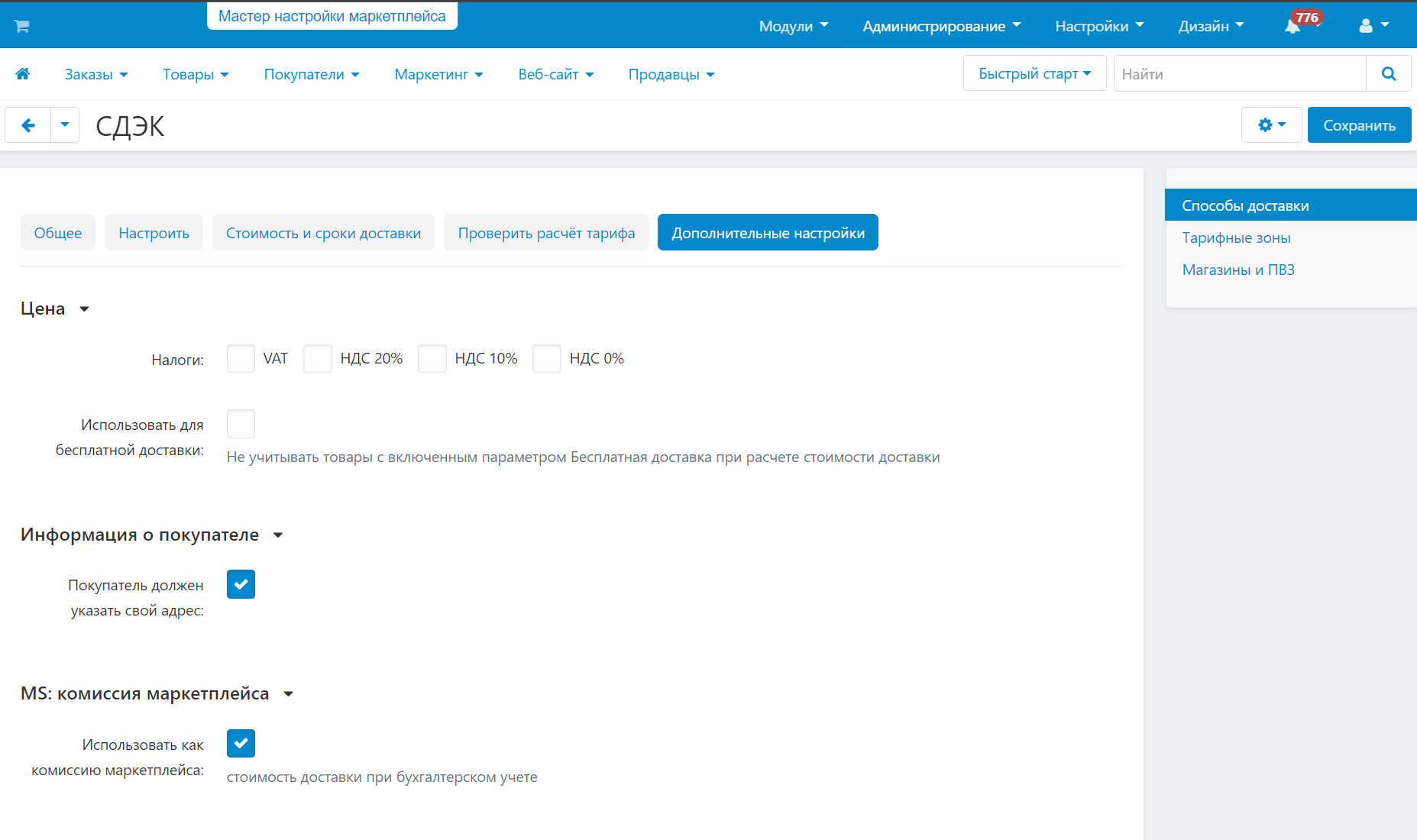
Configure a shipping method under Administration → Shipping → Shipping methods. The additional option is in the MS: marketplace commission section.
Configure a shipping method
- Open the required shipping method.
- In MS: marketplace commission, enable Use as marketplace commission.
- Save the changes.
Enable the option only for shipping methods whose cost must be retained by the marketplace.
What affects the calculation
The add-on works with vendor payouts and seller-plan settings. Shipping taxes and whether they are included in the commission depend on Vendor Plans settings. Shipping methods without the option enabled continue to use the platform’s standard calculation rules.
How to verify the result
- Configure a test shipping method with the marketplace-commission option enabled.
- Create a test order with that shipping method.
- Open the vendor payout calculation and verify that shipping cost is included in the marketplace commission.
- Repeat the check with the option disabled and compare the result with the seller plan’s standard rule.
Changelog
v1.1.2 from 06.08.2026
[*] Updated the add-on description and instructions; added localized materials and the logo.
v1.1.1 from 2026-03-18
[*] Updated the add-on template.
v1.1.0 from 2026-02-24
[*] Fixes and improvements:.
[*] Fixed an issue where changing “Use as marketplace commission” also changed “Use for free shipping”.
[+] Brought the add-on code and template to the current standard.
[+] Prepared the add-on for the 1.1.0 release.
v1.0.0 from 2024-04-12
[+] New features:.
[+] Initial release.
Legend:
[+] Added
[-] Removed
[*] Changed
[!] Bug fixed
Reviews