Антон Пономарев



Convenient Cart
This add-on is part of our Subscription plan.
Subscribe once — enjoy all add-ons without limits.
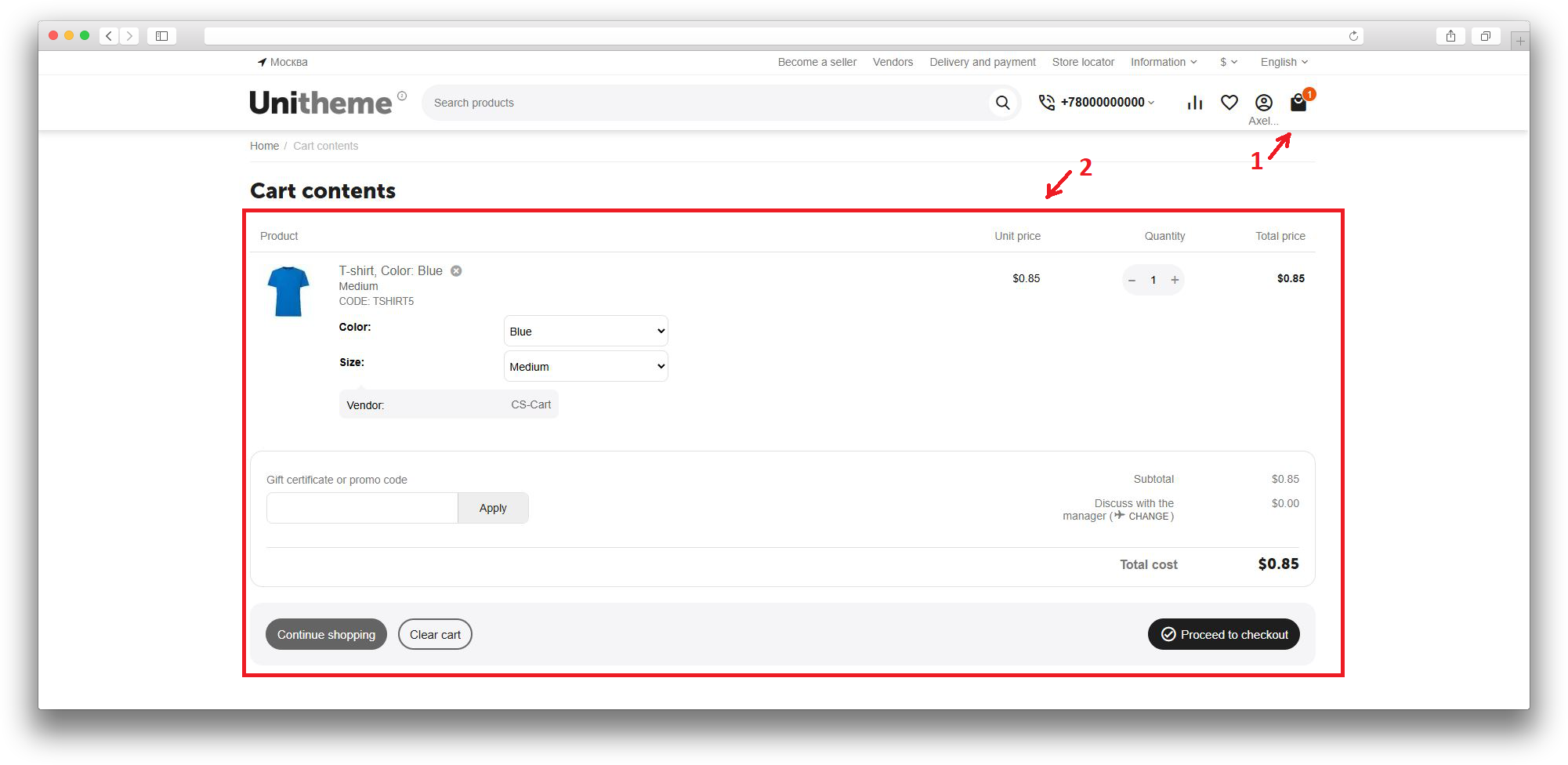
The Convenient Cart add-on shortens the path from cart to purchase. It helps remove extra transitions, lets customers edit products directly on the checkout page, and makes the checkout cart clearer.
This flow is especially useful for stores where customers often adjust quantity, options, or product variations before payment.
What it is for
The add-on helps customers get to checkout faster while keeping the ability to adjust order contents. Instead of going back to a separate cart page, the main cart actions are available directly during checkout.
Key features
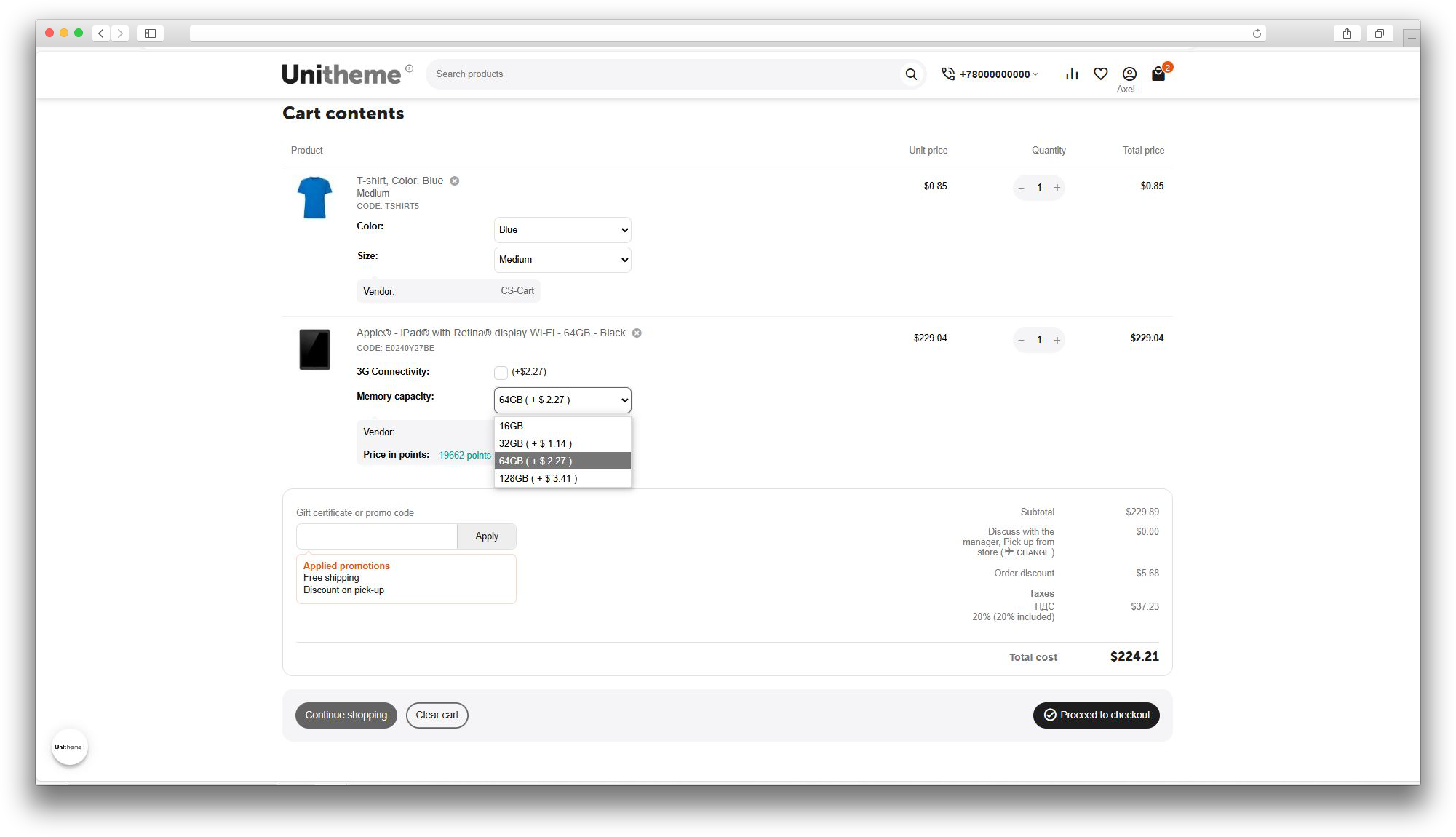
- changing product quantity on the checkout page without a page reload;
- removing products from the order without returning to the cart;
- changing product options and variations during checkout;
- automatic redirect from the cart page directly to checkout;
- hiding the popup after a product is added to the cart;
- showing the cart subtotal near the mini-cart;
- correct final validation of the minimum order amount;
- responsive product list display for the standard theme and Unitheme 2.
How it works
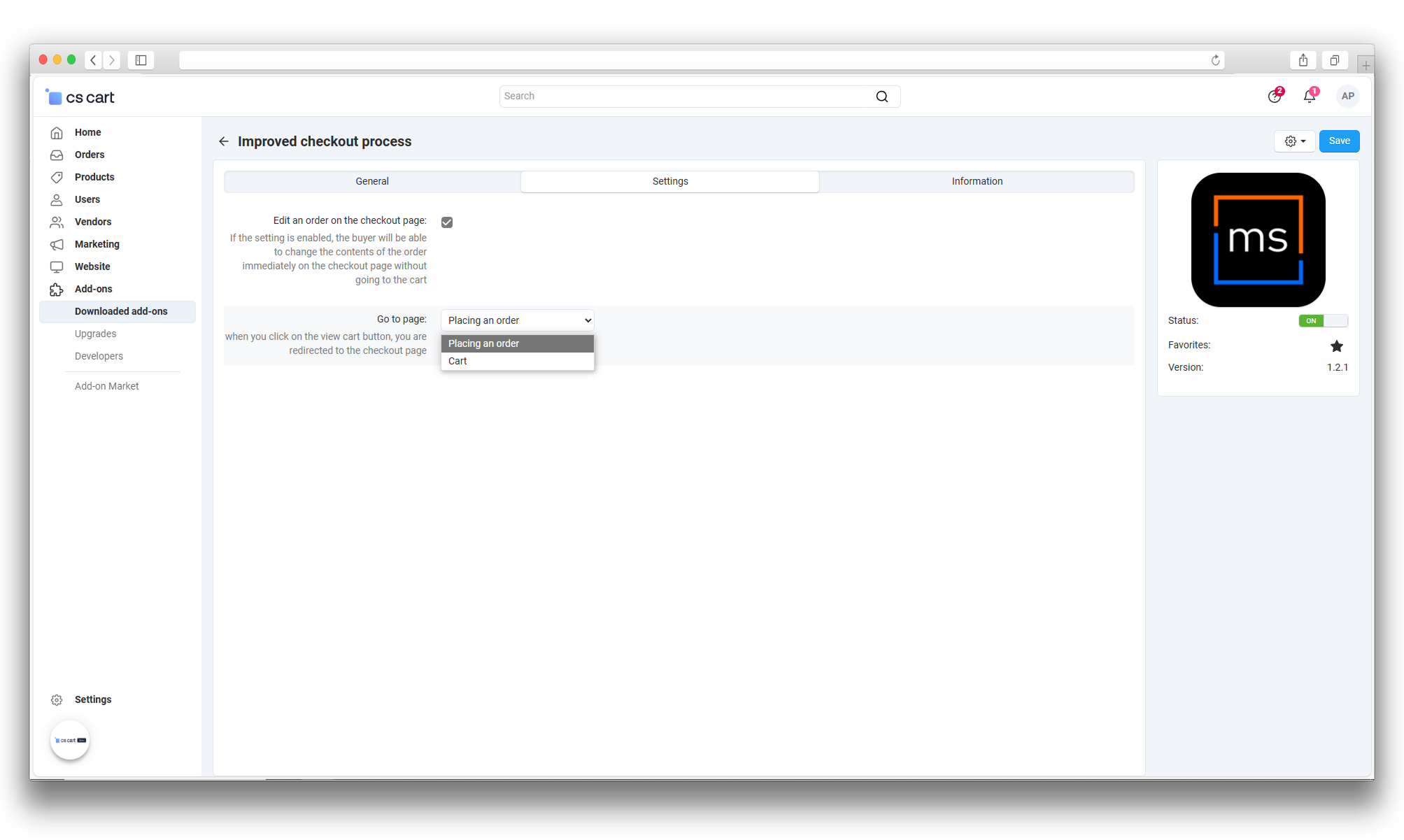
The administrator chooses where customers should go when they open the cart: to the standard cart page or directly to checkout. If checkout redirect is selected, the add-on shortens the customer path and automatically keeps order editing enabled on the checkout page.
On checkout, customers can change quantity with buttons, enter it manually, remove an item, select another available variation, or adjust product options. After a change, the add-on saves the cart and updates totals without forcing customers to return to the cart page.
If the store has a minimum order amount, the add-on does not block access to checkout too early, but keeps the standard validation before the order is finally placed.
Have questions about the add-on?
Product:
- Store Builder
- Store Builder Ultimate
- Multi-Vendor
- Multi-Vendor Plus
- Multi-Vendor Ultimate
Recipient:
- Buyers
- Owners
Localization:
- English
- Русский
Compatible versions:
- 4.21.X
- 4.20
- 4.19.X
- 4.18.X
Instructions for Convenient Cart
What the add-on does
Allows customers to change quantities, options and variations or remove items during checkout. Opening a non-empty cart can lead directly to checkout. The add-to-cart popup and cart subtotal display have separate settings.
Where to find the add-on
Open Add-ons → Manage add-ons → Convenient Cart. The four options are in the main settings section; the manual is available on the Instructions tab.
Configuration
- Open the Convenient Cart add-on card.
- Enable Edit order on the checkout page if customers should be able to change products directly on checkout.
- In Redirect to, choose Checkout to send customers directly to checkout, or Cart to keep the standard cart page.
- Enable Hide popups when adding products to cart if you do not want to show the popup after a product is added.
- Enable Show cart subtotal if the subtotal should be visible near the mini-cart.
- Save the settings.
Defaults and related settings
- Order editing is enabled and the redirect destination is Checkout by default.
- Choosing Checkout automatically enables editing and makes the checkbox read-only. Choose Cart first if you need to disable editing.
- Popup hiding is disabled; cart subtotal display is enabled.
- The redirect applies when opening a non-empty cart, not to every add-to-cart action. Hiding the popup does not itself enable a checkout redirect.
Usage
After configuration, the add-on works automatically. Customers add products to cart and proceed to checkout. If direct checkout redirect is enabled, the store skips the separate cart page.
On the checkout page, customers can change quantity with buttons, enter quantity manually, remove products, and, when the product supports variations or options, choose the required value without returning to the product page or cart.
How to check the result
- Add several products to the cart.
- Open the checkout page.
- Change the quantity of one product with the increase and decrease buttons and check that the order total is recalculated without a page reload.
- Enter quantity manually, leave the field, and check that the cart and totals are updated.
- Remove one product and make sure it disappears from the order.
- If the store uses product variations, select another available variation and check that the cart is saved correctly.
- Open the cart and make sure redirect follows the selected setting.
- Add a product to the cart and check the popup behavior.
Troubleshooting
- If editing is unavailable, check Edit order on the checkout page. When direct checkout redirect is enabled, this option is turned on automatically.
- If redirect goes to the wrong page, check Redirect to.
- If the cart subtotal is not visible, check Show cart subtotal and make sure there are products in the cart.
- If product changes are not saved, clear the CS-Cart cache and check compatibility with other add-ons that change cart or checkout behavior.
Additional checks
Check the settings on a test storefront using your theme. The package contains Responsive and Unitheme 2 templates; customized storefront templates require separate verification.
- Choose Cart and disable editing: checkout should no longer show option and variation editing controls.
- If a minimum order amount is configured, check an order below the threshold. Access to checkout may be allowed, but final placement must not bypass the limit.
- When fractional quantities are used, change a variation and confirm that its quantity is retained. If the replacement cannot be added, the original cart item should remain.
- Reload the page after making changes and verify cart contents, selected options and totals.
Changelog
v1.6.1 from 11.09.2026
[!] Fixed:.
[*] Preserve fractional product quantities when changing variations.
[*] Restore the cart state when adding a replacement variation fails.
[*] Reject variation changes for missing cart items or invalid product identifiers.
v1.6.0 from 2026-05-07
[*] Updated the admin add-on card sidebar template wrapper.
[*] Updated service tab styles for long links, lists, and text.
[*] Updated the add-on version row label in the add-on card.
[+] Removed extra outdated add-on card assets.
[+] Removed an extra service check that did not affect add-on behavior.
[*] Improved direct checkout redirect reliability: the redirect now runs before the core cart controller and preserves the storefront access key.
[!] Fixed product option updates in the responsive checkout layout: options now target the current checkout form.
[+] Restored the native cart form in add-on checkout templates so background AJAX checkout updates keep product data.
[!] Fixed option and variation editing display in Unitheme 2: editing controls are no longer shown when order editing is disabled.
[+] Adjusted add-on settings saving so service handling no longer affects settings of other add-ons with similar names.
v1.5.3 from 2026-04-29
[+] Added product quantity updates on the checkout page without a page reload: via increase/decrease buttons, manual input, and leaving the quantity field.
[*] Improved the responsive layout of the checkout product list for different screen sizes.
[*] Updated the add-on template and service blocks in the add-on card.
[+] Moved add-on documentation to the current HTML format.
[*] Fixed a storefront script error when product quantity is updated on the checkout page.
[!] Fixed the order editing setting behavior when customers are sent directly to checkout.
v1.5.2 from 2025-11-18
[*] Changed the cart icon display in the Cart block.
v1.5.1 from 2025-08-06
[*] Reworked product display on the checkout page.
v1.5.0 from 2025-04-22
[+] Added the ability to show the cart subtotal.
[+] Added template hooks and moved product markup into a separate template.
[!] Fixed PHP notices.
v1.4.0 from 2025-03-25
[+] Added the ability to hide the popup when a product is added to the cart.
v1.3.0 from 2025-03-18
[+] Fixed incorrect add-on behavior in orders when the minimum order amount is enabled.
[*] Updated the store icon.
v1.2.0 from 2025-01-13
[*] Added the ability to change options and variations on the checkout page.
[+] Standardized the add-on.
[*] Out-of-stock variations became clickable on the checkout page.
[*] When checkout redirect is selected, the order editing setting becomes enabled and read-only.
[!] Fixed a layout issue in the product section on the checkout page.
[+] Fixed incorrect behavior when saving add-on settings.
v1.1.2 from 2024-07-12
[*] Updated language variables for some settings.
v1.1.1 from 2024-07-11
[!] Fixed the cart block layout in Unitheme 2.
v1.1.0 from 2023-12-19
[+] Added an actuality check when products are added to cart.
[+] Added an extra check for functions from other add-ons.
[*] Changed redirect setting behavior: now customers can be sent to checkout or to the cart.
[-] Removed the override of the lower button panel template for mobile devices.
v1.0.3 from 2023-07-31
[!] Fixed a redirect loop on mobile devices.
v1.0.2 from 2023-04-30
[+] Added the ability to tap the quantity increase or decrease button several times in a row.
v1.0.1 from 2023-04-27
[*] Improved the mobile version and removed the user ID check.
v1.0.0 from 2023-04-24
[+] Initial add-on release.
Legend:
[+] Added
[-] Removed
[*] Changed
[!] Bug fixed
Reviews
Диана Рахматулина
Petr Ovlonov